Apache Kafka is a popular open-source platform for building real-time streaming data pipelines and applications. More than 80% of all Fortune 100 companies use Kafka to modernize their data architecture.
Kafka has several use-cases:
- Real-time web and log analytics
- Transaction and event sourcing
- Messaging
- Decoupled microservices
- Event-Driven-Architectures
- Streaming ETL
- Change data capture
- Metrics and log aggregation
- Streaming ML
Designing a Kafka streaming application
There are a number of different ways to run Kafka.
You can deploy and manage your own Kafka solution on-premises or in the cloud on Amazon EC2. For more information on hosting Kafka yourself, read Best Practices for Running Apache Kafka on AWS on the AWS Big Data Blog.
Amazon Managed Streaming for Apache Kafka (MSK) is a fully managed service that makes it easier for you to build and run applications that use Kafka to process streaming data. You can populate data lakes, stream changes to and from databases, and power machine learning and analytics applications.
Amazon MSK has the following features:
- Automate provisioning, configuring, and tuning. Reduce operational overhead, including the provisioning, configuration, and maintenance of Apache Kafka and Kafka Connect clusters. You can configure your application for high availability across multiple Availability Zones.
- Fully compatible with open-source Apache Kafka. Use applications and tools built for Apache Kafka out of the box, including MirrorMaker, Apache Flink, and Prometheus. Use the native Apache Kafka APIs, without having to change application code. You can use multiple open-source versions of Kafka.
- Highly secure. Easily deploy secure, production-ready applications using native integrations to an Amazon Virtual Private Cloud (VPC). You can use AWS Identity and Access Management (IAM) for simple authentication and authorization.
- Lower cost. Keep costs low with fully managed Apache Kafka, offered at as low as 1/13th the cost of other providers. Data replication between Availability Zones is included at no additional cost with MSK.
MSK Serverless is a cluster type for Amazon MSK that allows you to run Kafka without having to manage and scale cluster capacity. It automatically provisions and scales capacity while managing the partitions in your topic, so you can stream data without thinking about right-sizing or scaling clusters. MSK Serverless offers a throughput-based pricing model, so you pay only for what you use. Consider using a serverless cluster if your applications need on-demand streaming capacity that scales up and down automatically.
MSK Express Brokers for MSK Provisioned make Apache Kafka simpler to manage, more cost-effective to run at scale, and more elastic with the low latency you expect. Brokers include pay-as-you-go storage that scales automatically and requires no sizing, provisioning, or proactive monitoring. Depending on the instance size selected, each broker node can provide up to 3x more throughput per broker, scale up to 20x faster, and recover 90% quicker compared to standard Apache Kafka brokers. Express brokers come pre-configured with Amazon MSK’s best practice defaults and enforce client throughput quotas to minimize resource contention between clients and Kafka’s background operations.
You can use Confluent Cloud as a fully managed Kafka data streaming platform or use Confluent Platform if you prefer to deploy and manage the platform yourself. You can use Kafka Connect or Confluent Cloud Connectors to send data to and from a number of AWS sources and targets (sink connectors).
Kafka architectural patterns
Clusters, topics, and records
Kafka clusters store a stream of related records in an ordered, immutable log called a topic. Kafka records are also called messages or events. A Kafka record includes a key and a value, along with headers and a timestamp.
Producers and consumers
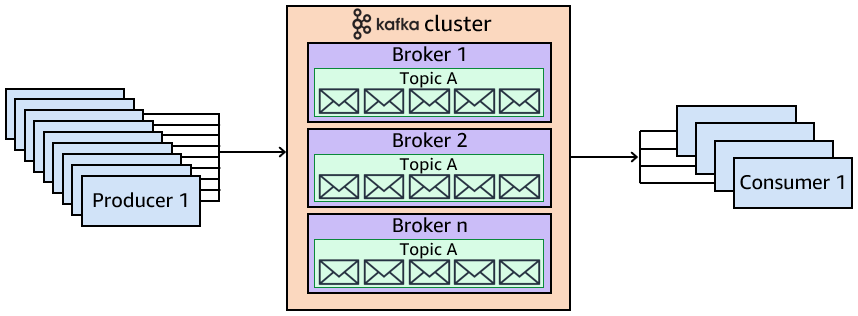
Producers create records and send them to one or many topics on a Kafka cluster.
Consumers read and process streams of records. The record consumer chooses where to start reading the stream. This can be from the earliest record available on the stream or somewhere in the middle. The consumer continues to read and process records until new records arrive. You can also choose to process only new records, ignoring records already in the stream.
Record streams are persistent in Kafka as Kafka acts as a record store. Kafka does not remove records once consumers process them. You rather configure record retention periods. When the record retention period expires, Kafka removes the records.
Partitions
Topics can be split into partitions for improved scalability and throughput. Each partition is a single log file where Kafka writes records in an append-only fashion.
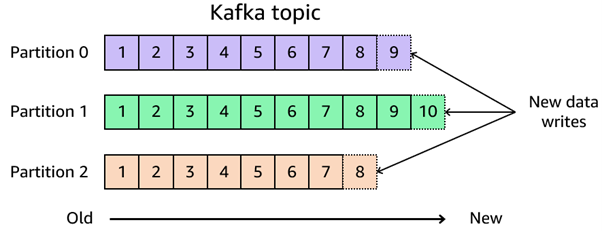
When producers send records to a stream, the partition key determines which partition it routes to. Kafka hashes the partition key and uses the result to map the record to a specific partition. Messages with the same partition key route to the same partition. If producers don't specify a partition key, records are distributed round-robin across all the topic's partitions. If the topic has a single partition, the partition key has no effect, all records route to the same partition. If the topic has multiple partitions, Kafka assigns records to partitions by hashing the partition key and mapping to individual partitions.
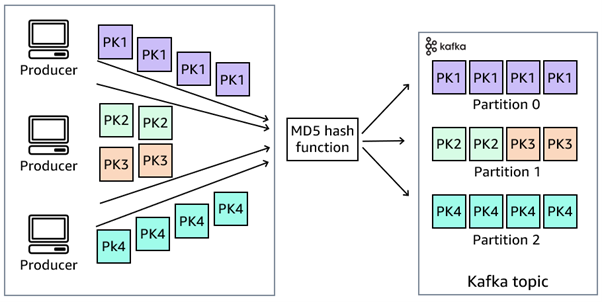
Records with the same key always write to the same partition, and records in a partition are always in order.
You can influence the partition assignment depending on your choice of partition key.
- Random: A random value results in random hash, so records are randomly sent to different partitions. This effectively load balances records across all available partitions.
- Time-based: A timestamp value may cause groups of records to be sent to a single partition, if the records arrive at the same time. The identical timestamp results in an identical hash.
- Application-specific: If you produce records that are all related to a particular customer, you can use the customerID as the key. All records for that customer are routed to the same partition and always arrive in order. This can be useful for downstream aggregation logic but may limit the capacity of records per customerID.
Offsets
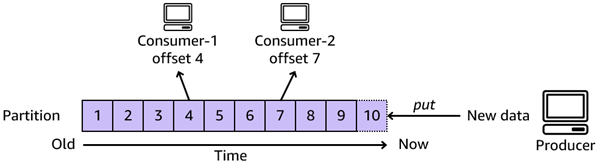
Records in partitions are each assigned a sequential identifier called the offset. This is unique for each record within the partition and incrementally tracks which record a particular consumer is processing.
Created by: