The Lambda event source mapping resource polls records from one or many partitions and sends them to your Lambda function for processing.
You can create the Lambda event source mapping using the AWS CLI or AWS SDK, which uses the CreateEventSourceMapping API.
For a complete tutorial, see Amazon MSK Lambda Integration in the Amazon MSK Labs.
ESM setup process overview
Before the ESM can invoke your Lambda function, the ESM automatically completes the following steps:
The ESM calls AWS STS APIs to get a security token.
If SourceAccessConfiguration contains a secret, the ESM retrieves the secret from Secrets Manager.
Resolve the broker address.
- For self-managed Kafka ESM: Lambda resolves the IP address of the cluster endpoints from the hostname that's configured in the ESM.
- For MSK ESM: Get the MSK cluster's subnet and security group configuration.
Connect to the broker:
- For self-managed Kafka ESM: Establish a network connection to the broker endpoint.
- For MSK ESM: Create a hyperplane elastic network interface with the MSK cluster's security group in each of the MSK cluster's subnets.
Authentication:
- If TLS Auth is activated, check the SSL certificate that is presented by the broker endpoint.
- Log in to the broker.
Authorization:
- Make sure that the topic exists in the cluster. Ask the cluster brokers if the topic that's configured in the ESM's Topics parameter exists in the cluster.
- Create a consumer group in the cluster, using the ESM's UUID as the consumer group ID.
Poll records from the topic.
Bundle the records into a payload that fits within the configured batch limits and is smaller than 6 MB. This is the limit for Lambda invocation payloads.
The ESM invokes the associated Lambda function with the payload of records with a synchronous call to the Lambda Invoke API.
Lambda Kafka options
Starting position
Lambda supports the following options for when to start reading records:
- LATEST : Lambda starts reading the stream from the latest record once Lambda configures the trigger. This means that there can be a delay between configuring the trigger and the first record processed.
- AT_TIMESTAMP : Specify a timestamp for Lambda to start reading from.
- TRIM_HORIZON : Lambda starts reading at the earliest available record in the stream.

Schema Registry Support
In Provisioned Mode the Kafka ESM supports configuring a Schema Registry which is used to validate records against the schema. The ESM will also optionally deserialize Avro and Protobuf records. The ESM supports the AWS Glue Schema Registry, Confluent Cloud Schema Registry, and self-managed Confluent Schema Registry.
This feature supports two options, SOURCE and JSON, for the Event Record Format which is delivered to your Lambda function. The SOURCE option preserves the original binary format of the data as a base64-encoded string with producer-appended schema-id removed. This allows direct conversion to Avro or Protobuf objects so that you can use Kafka’s ConsumerRecords interface for a Kafka-like experience. Use this format when working with strongly typed languages or when you need to maintain the full capabilities of Avro or Protobuf schemas. Then, you can use any Avro or Protobuf deserializer to convert raw bytes to your business object. Powertools for AWS Lambda provides native support for this deserialization. The JSON option causes the ESM to deserialize the data, to be ready for direct use in languages with native JSON support. Use this when you don’t need to preserve the original binary format or work with generated classes. You can also use Powertools to convert the base64 to your business object. See the documentation for payload formats and deserialization behavior.
Schema Validation and deserialization happens before filtering and batching, meaning that you can use Lambda event filtering on Avro and Protobuf records. This blog post has detailed steps to configure schema registry support.
Lambda event filtering
You can use event filtering to control which records from your stream Lambda sends to your function. You can use filtering to reduce the traffic to your function, which can reduce costs. Filter patterns can include metadata properties, data properties, or both.
FleetTirePressureMapping:
    Type: AWS::Lambda::EventSourceMapping
    Properties:
      FunctionName: fleet-tire-pressure-evaluator
      BatchSize: 100
      StartingPosition: LATEST
      EventSourceArn:
	arn:aws:kafka:...:stream/fleet-telemetry
      FilterCriteria:
        Filters:
          - Pattern: |
            {
              "data": {
                "tire_pressure": [{"numeric": ["<", 32]}]
              }
            }
The event source mapping allows up to five patterns. If a record from your event source matches a filter, Lambda includes the record in the next event it sends to your function. If the record doesn't match any filters, Lambda drops the record. For self-managed Kafka, Lambda commits offsets for matched and unmatched records after successfully invoking the function.
When you update a Kafka ESM with new filter criteria, it can take up to 15 minutes for Lambda to apply your changes. Before Lambda applies the changes, Lambda uses the previous filter settings.
For more information on how to create filters, refer to examples of event pattern rules in Amazon EventBridge, as Lambda filters records in the same way.
Batching
The Lambda ESM reads records sequentially from each partition in the Kafka topic. It batches records together into a single payload that Lambda sends to your function. A single Lambda payload can contain records from multiple partitions.
Lambda frequently commits the offset of the records of the last successfully processed batch. If your function returns an error for any of the records in a batch, Lambda retries the whole batch of records until processing succeeds or the records expire.
You can fine-tune batching behavior by configuring a MaximumBatchingWindowInSeconds and a BatchSize. A batch size is the maximum number of records in a single batch. A batching window is the maximum amount of time to gather records into a single payload. Lambda invokes your function when one of the following three criteria is met:
- The batch size is met. The minimum batch size is 1. The default batch size is 1 and the maximum batch size is 10,000.
- The batching window reaches its maximum value. The default batching window is 500 ms. You can configure
MaximumBatchingWindowInSecondsto any value from 0 seconds to 300 seconds in increments of seconds. A batching window begins as soon as the first record arrives. When no new records are available, Lambda waits for records to arrive until the batching window reaches its maximum value before returning the payload. - The payload size reaches 6 MB. You cannot modify this limit, as this is the Lambda invocation payload limit.
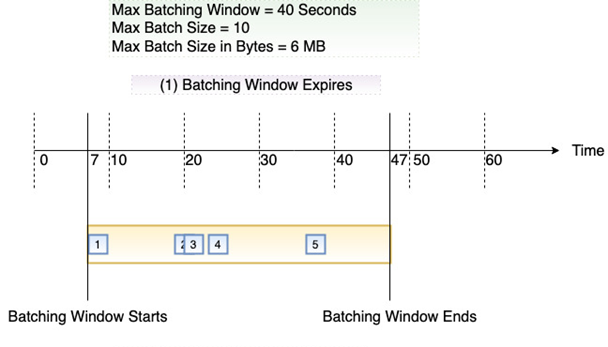
The following diagrams show these three conditions. Suppose a batching window begins at t = 7 seconds. In the first scenario, the batching window reaches its 40 second maximum at t = 47 seconds after accumulating 5 records.
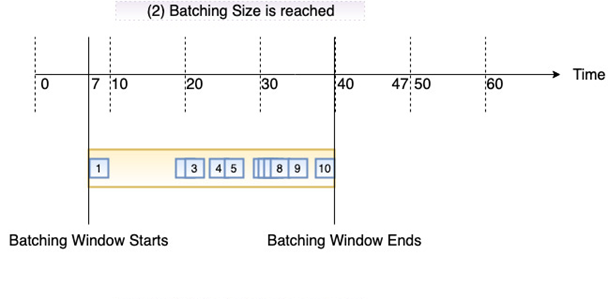
In the second scenario, the batch size reaches 10 before the batching window expires, so the batching window ends early.
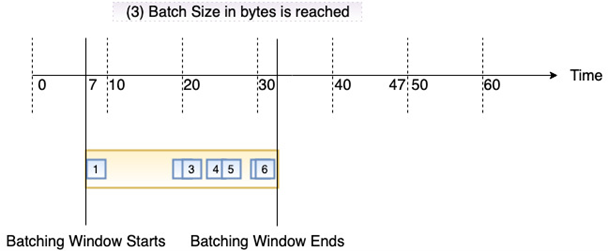
In the third scenario, the maximum payload size is reached before the batching window expires, so the batching window ends early.
For functions that require the lowest possible latency, enable Provisioned Mode and set the Batching Window to 0. In this setting the Kafka ESM invokes the function with Kafka events immediately after the previous invocation completes. This configuration makes end-to-end latency solely dependent on function duration, thus potentially providing average 50ms end-to-end latencies for critical real-time applications.
Function timeout
Lambda functions typically have a maximum timeout limit of 15 minutes. However, Amazon MSK and self-managed Apache Kafka ESMs only support a maximum timeout limit of 14 minutes. This ensures that the event source mapping can properly handle function errors and retries.
Customizable consumer group ID
When setting up Kafka as an event source, you can optionally specify an existing consumer group ID that you want your Lambda function to join. If there are other active pollers within that consumer group, Kafka distributes records across all consumers so Lambda won't receive all records for the Kafka topic. If you want Lambda to handle all records in the topic, turn off any other pollers in that consumer group. ESM consumers cannot join a consumer group if the existing consumers are using a different consumer strategy than the ESM consumers. Ensure that all consumers in the group are using the same consumer strategy
If you specify an existing consumer group ID, Lambda begins processing records according to the committed offset of the consumer group, rather than the StartingPosition parameter for your ESM. If the offsets are invalid as the records have already expired, then Lambda uses the StartingPosition.
After creating a Kafka event source mapping with the consumer group ID specified, you cannot update this value, you must re-create the ESM.
Error handling
Lambda reads the records sequentially for each partition. Lambda frequently commits the offset of the records of the last successfully processed batch.
If your function returns an error for any of the records in a batch, Lambda retries the whole batch of records until processing succeeds or the records expire from the stream. If the function times out, Lambda also retries the whole batch.
A bad record format or invalid record content can cause your Lambda function to fail processing. To resolve the issue depends on your application requirements. If you must maintain strict ordering, you must amend your function code to handle the exception or discard the record and continue processing.
If you don't require strict ordering, you can enable a Failure Destination on your ESM. If you enable a Failure Destination the ESM tries to process a batch of records, it may retry that batch a few times. If it still fails the ESM takes batches of records that fail and writes them to the specified Destination. The Failure Destination can be an SQS Queue, SNS Topic, or S3 Bucket. If you're using an SQS Queue or SNS Topic, the records written to the Failure Destination only contain the metadata for those records and you have to read from the topic to get the payload. For S3 Failure Destinations the metadata and payload are both written to the S3 bucket. More details of what those records look like is in the documentation. If you want more control over the number of retries you can catch errors in your code and write the failed records to a separate dead-letter queue (DLQ). You can continue processing the remaining records and ensure your function doesn't return an error. The DLQ can be another Kafka topic, or a separate queue in, for example, Amazon SQS. You can monitor the DLQ for failed records and have a process to handle them.
For more error handling information, read the documentation.
Created by: