There are a number of guides to setting up Kafka and the consumer Lambda ESM.
The Kafka and Confluent documentation includes steps to install Kafka. Using self-hosted Apache Kafka as an event source for AWS Lambda describes setting up the Lambda ESM when consuming from self-hosted Kafka.
This Amazon MSK tutorial shows an example of how to create an MSK cluster, produce and consume data, and monitor the health of your cluster using metrics. Using Amazon MSK as an event source for AWS Lambda describes setting up Lambda ESM to read from Amazon MSK. The Amazon MSK Labs workshop provides an install guide.
There are a number of Serverless Patterns you can use to deploy and test Amazon MSK integrations. You can deploy an Amazon MSK cluster using the SASL authentication pattern. For IAM authentication, there are patterns for Node.js and Python.
Security
Lambda supports several methods to authenticate with your self-managed Kafka cluster and Amazon MSK.
SASL/SCRAM authentication
Lambda supports Simple Authentication and Security Layer/Salted Challenge Response Authentication Mechanism (SASL/SCRAM) authentication with TLS encryption. Lambda sends the encrypted credentials to authenticate with the cluster. Lambda doesn't support SASL/SCRAM with plaintext. Amazon MSK Serverless doesn't support SASL/SCRAM. The SASL/SCRAM authentication pattern shows how to use this authentication mechanism with Amazon MSK.
Lambda with self-managed Kafka supports SASL/PLAIN authentication. Because this uses clear text credentials, the connection to the server must use TLS encryption to ensure that the credentials are protected. Amazon MSK doesn't support SASL/PLAIN authentication.
For SASL authentication, you store the sign-in credentials as a secret in AWS Secrets Manager. For more information about using Secrets Manager, see AWS Secrets Manager tutorials.
Mutual TLS authentication
Mutual TLS (mTLS) provides two-way authentication between the client and server. The client sends a certificate to the server for the server to verify the client, and the server sends a certificate to the client for the client to verify the server.
Using mTLS with Kafka, Lambda acts as the client. You configure a client certificate (as a secret in Secrets Manager) to authenticate Lambda with your Kafka brokers. The client certificate must be signed by a CA in the server's trust store.
For more information about mTLS, see Introducing mutual TLS authentication for Amazon MSK as an event source.
Amazon MSK, in addition to supporting the same authentication as self-hosted Kafka, supports the following options:
Unauthenticated access
If no clients access the cluster over the internet, you can use unauthenticated access.
IAM role-based authentication
You can use IAM to authenticate the identity of clients that connect to the MSK cluster. For Lambda, the ESM handles the authentication. If IAM Auth is active on your MSK cluster, and you don't provide a secret for auth, Lambda automatically defaults to using IAM Auth. You can deploy patterns for Node.js and Python, which show how the ESM makes it easier to use IAM authentication. When producing Kafka records, there are open-source client helper libraries and code samples for popular languages.
Make sure that you configure the Kafka cluster to use one of these supported authentication methods. For more information about general Kafka security, see the Kafka Security documentation.
For more information on Lambda integration authentication, see the specific Amazon MSK or self-managed Kafka documentation.
Lambda and Kafka supported authentication methods:
| SASL/SCRAM + TLS | SASL/PLAIN | IAM | TLS | Unauthenticated | |
|---|---|---|---|---|---|
| Self-managed Kafka | Yes | Yes | No | Yes | No |
| Amazon MSK | Yes | No | Yes | Yes | Yes |
| Amazon MSK Serverless | Yes | No | Yes | Yes | Yes |
Lambda permissions
Lambda can authenticate against Kafka using IAM or SASL.
The Lambda function target in the event source mapping does not need to be running in a VPC to receive records from Amazon MSK. For more information on Kafka networking requirements for Lambda, see the Networking section below.
The Lambda function must have permission to describe VPCs and security groups, and manage elastic network interfaces. These execution roles permissions are:
- ec2:CreateNetworkInterface
- ec2:DescribeNetworkInterfaces
- ec2:DescribeVpcs
- ec2:DeleteNetworkInterface
- ec2:DescribeSubnets
- ec2:DescribeSecurityGroups
To create and store logs in a log group in Amazon CloudWatch Logs, your Lambda function must have the following permissions in its execution role:
When using Amazon MSK, for Lambda to access your cluster on your behalf, your function must have the following permissions in its execution role:
Your Lambda function might also need permissions to:
- Describe your Secrets Manager secret.
- Access your AWS Key Management Service (AWS KMS) customer managed key.
- Access your Amazon VPC.
To access the Amazon MSK data stream, the Lambda function also needs two Kafka permissions: kafka:DescribeCluster and kafka:GetBootstrapBrokers. The policy template AWSLambdaMSKExecutionRole includes these permissions.
In AWS Serverless Application Model (AWS SAM) templates, you can configure a Lambda function with an Amazon MSK event source mapping and the necessary permissions. For example:
Resources:
  ProcessMSKFunction:
    Type: AWS::Serverless::Function
    Properties:
      CodeUri: code/
      Timeout: 3
      Handler: app.handler
      Runtime: nodejs18.x
      Policies:
      - AWSLambdaMSKExecutionRole
      Events:
        MSKEvent:
          Type: MSK
          Properties:
            StartingPosition: LATEST
            Stream: arn:aws:kafka:us-east-1:123456789012:cluster/my-cluster/12abcd12-1234-1234-1234-1234abcd1234-1
            Topics:
            - MyTopic
Networking
When using self-hosted Kafka, you manage the EC2 instances that run Kafka. For high availability, you should run Kafka EC2 instances in a minimum of two Availability Zones in your preferred Region.
Amazon MSK is a highly available service, so it must be configured to run in a minimum of two Availability Zones in your preferred Region.
To comply with security best practice, you should deploy your self-managed or Amazon MSK brokers in private subnets in each Region.
The Lambda function that the ESM invokes does not need connectivity to your Kafka VPC to receive records from Kafka. However, the Lambda service does need a network connection to your Kafka VPC to pull records. Lambda-Kafka ESMs don't inherit the VPC network settings of the Lambda function for both MSK triggers and self-managed Kafka triggers. An MSK ESM uses the subnet and security group settings that are configured on the target MSK cluster. A self-managed Kafka trigger has WAN access by default, but can be configured with network access to a VPC in the same account and AWS Region. Because the network configuration is separate, a Lambda function can run code within a network that doesn't have a route to the Kafka cluster.
Self-managed Kafka
A self-managed Kafka ESM's network configuration is similar to a Lambda function. By default, the ESM has access to the WAN but isn't configured for access within a VPC. You can manually configure specific subnets and security groups to access a Kafka cluster. The ESM can access a cluster that's reachable from a VPC in the same or a different account that contains the Lambda function.
For the Lambda function to poll the Kafka instances, you must ensure that there is a NAT Gateway running in the public subnet of each Region. It's possible to route the traffic to a single NAT Gateway in one AZ for test and development workloads. For redundancy in production workloads, it's recommended that there is one NAT Gateway available in each Availability Zone.

To learn more about configuring the private subnet table to use a NAT Gateway, see this AWS Support response. For an example of how to configure the infrastructure with AWS CloudFormation, see this template.
Additional Information: Setting up AWS Lambda with an Apache Kafka cluster within a VPC.
It is possible to create a self-managed Kafka trigger that consumes from an MSK cluster in another account. However, unlike an MSK trigger, AWS IAM authentication isn't available for self-managed Kafka triggers. Also, connecting to the MSK cluster over a VPC-peered connection requires specific VPC workarounds. For more information, see Connect Kafka client applications securely to your Amazon MSK cluster from different VPCs and AWS accounts.
Amazon MSK
Lambda to MSK connectivity
To communicate with the MSK cluster, an MSK ESM creates a hyperplane elastic network interface inside each subnet that's used by the cluster. This is similar to how a Lambda function operates within a VPC.
An MSK ESM doesn't use the Lambda function's VPC settings. Instead, the ESM automatically uses the subnet and security group settings that are configured on the target MSK cluster. The MSK ESM then creates a network interface inside each of the subnets that are used by the MSK cluster. These network interfaces use the same security group that's used by the MSK cluster.
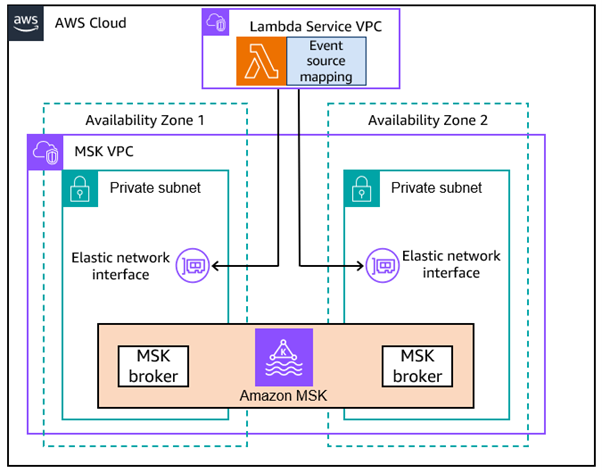
The MSK cluster's security group must include a rule that grants inbound traffic from itself and outbound traffic to itself. The traffic must also be granted over one of the following open authentication ports that's used by the broker:
- 9092 for plaintext
- 9094 for TLS
- 9096 for SASL
- 443 for all configurations
VPC outbound connectivity
The Provisioned Mode for the Kafka ESM features simplified networking, so you don't need to worry about outbound connectivity. This also has the advantage of reducing your networking charges.
If you're using the On-demand(default) version of the Lambda Kafka ESM your MSK VPC also requires outbound network connectivity to Lambda and AWS Security Token Service (STS). The ESM contacts STS from your MSK VPC network to assume a role for the target Lambda function and invokes the function. For some authentication options, it also requires access to AWS Secrets Manager.
You can configure outbound connectivity to AWS services using VPC endpoints or NAT Gateway.
Create VPC endpoints for Lambda, STS, as well as Secrets Manager, if required, from your private subnets.

If using NAT Gateway, you must ensure that there is a NAT Gateway running in the public subnet of each Region. It's possible to route the traffic to a single NAT Gateway in one AZ for test and development workloads. For redundancy in production workloads, it's recommended that there is one NAT Gateway available in each Availability Zone.
 o
o
Cross Account Event Source Mappings
You can configure cross account event source mappings for MSK clusters running in another account. This is done using MSK multi-vpc private connectivity. Note that this isn't currently supported for MSK Serverless clusters. For more details this blog details the setup process
Created by: