Kafka uses partitions to increase throughput and spread the load of records to all brokers in a cluster. The Lambda ESM can scale up automatically to handle additional load.
Kafka event source mapping auto scaling
The Event Source Mappings for Kafka have two modes that have different performance characteristics, the first is On-demand mode which is the default, the second is Provisioned mode.
On-demand mode
The Lambda event source mapping resource includes pollers and processors. Pollers have consumers that read records from Kafka partitions. The poller assignors send them to processors which batch the records and invoke your function.
When you initially create a Kafka event source mapping, Lambda allocates a single consumer with multiple processors to process all partitions in the Kafka topic. Records in each partition are only assigned to a single processor to maintain order.
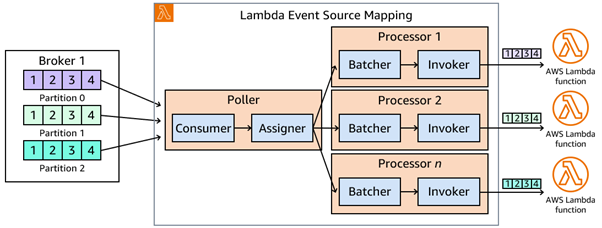
Lambda automatically scales up or down the number of consumers and processors, based on workload. Lambda samples the consumer offset lag of all the partitions in the topic every minute. If the lag is increasing, this means Lambda can't keep up with processing the records from the partition. The scaling algorithm takes into account the current offset lag, as well as the rate of new messages added to the topic.
The Kafka broker distributes partitions across consumers as part of a process called rebalance. During this rebalance, the consumer does not wait for in-flight records, which could lead to record duplication. Functions should process records idempotently.
Total processors for all pollers can only scale up to the total number of partitions in the topic.
After successful invokes, the poller periodically commits offsets to the respective brokers.
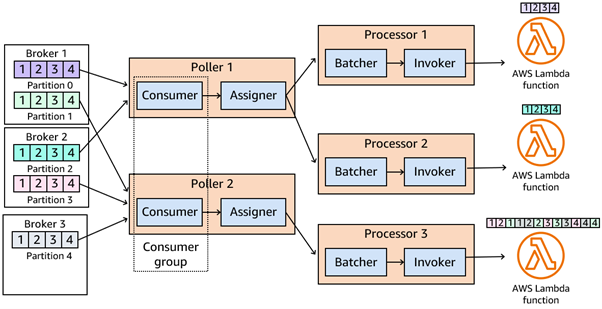
If your target Lambda function is overloaded, Lambda reduces the number of consumers. For example, if your target Lambda function returns a throttle, the ESM reduces the number of consumers, which reduces the number of Lambda invocations.
You can monitor the throughput of your Kafka topic using consumer metrics consumer_lag and consumer_offset.
To check how many function invocations occur in parallel, you can also monitor the concurrency metrics for your function. The concurrency is approximately equal to the total number of processors across all pollers, depending on processor activity. For example, if three pollers have five processors running for a given ESM, the function concurrency would be approximately 15 (5 + 5 + 5).
Provisioned Mode
The easiest way to increase the performance of your Kafka consuming Lambda application is to enable Provisioned Mode on the ESM. With Provisioned Mode you specify the MinimumPollers and MaximumPollers and then the ESM quickly autoscales between the min and max as message volume and offset lag changes. In Provisioned Mode each Provisioned Poller is a compute unit capable of handling up to 5MBps of throughput and 5 concurrent Lambda invocations. Provisioned Mode does have a cost component, pricing details, so we recommend starting with the minimum number of Provisioned Pollers(MinimumPollers = 1) and baselining the performance of your workload. Then adjust the minimum upwards if your workload needs it, such as use cases with sudden surges in message volume and strict performance needs.
For the low latency(sub 100ms) processing, set the MaximumBatchingWindowInSeconds to 0. Using this setting, combined with Provisioned Mode, tells the ESM to invoke the next batch of records immediately after the previous invocation completes.
Increasing data processing throughput
It is important that your function can keep pace with the rate of traffic. A growing offset lag means the function processing cannot keep up. If the age is high in relation to the stream's retention period, you can lose data as records expire from the stream. This value should generally not exceed 50% of the stream's retention period. When the value reaches 100% of the stream retention period, data is lost. One temporary solution is to increase the retention time of the stream. This gives you more time to resolve the issue before losing data.
There are several ways to improve processing throughput.
- You can avoid processing unnecessary records by using content filtering to control which records Lambda sends to your function. This helps reduce traffic to your function, simplifies code, and reduces overall cost.
- Lambda allocates processors across all pollers based on the number of partitions up to a maximum of one concurrent Lambda function per partition. You can increase the number of processing Lambda functions by increasing the number of partitions.
- For compute intensive functions, you can increase the memory allocated to your function, which also increases the amount of virtual CPU available. This can help reduce the duration of a processing function.
- Lambda polls Kafka with a configurable batch size of records. You can increase the batch size to process more records in a single invocation. This can improve processing time and reduce costs, particularly if your function has an increased init time. A larger batch size increases the latency to process the first record in the batch, but potentially decreases the latency to process the last record in the batch. There is a tradeoff between cost and latency when optimizing a partition’s capacity and the decision depends on the needs of your workload.
- Ensure that your producers evenly distribute records across partitions using an effective partition key strategy. A workload is unbalanced when a single key dominates other keys, creating a hot partition, which impacts throughput.
Created by: