Monitoring Lambda metrics
Lambda sends metrics to CloudWatch metrics. The monitoring tab of the function shows general metrics that can highlight problems in your workload.
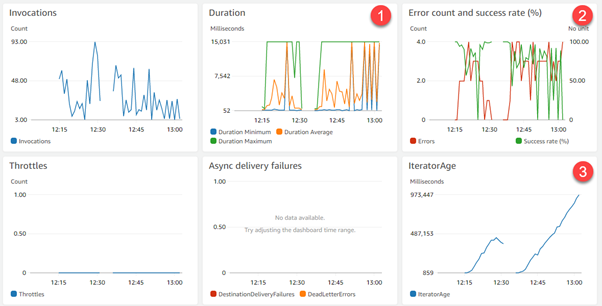
- The Duration chart shows that the function is exceeding its 15-second timeout, when the function normally finishes in under a second. This typically shows that there are too many records to process in a single batch, or throttling is occurring downstream.
- The Error count metric is growing, which highlights either logical errors in the code or errors from API calls to downstream resources.
- The IteratorAge metric appears for Lambda functions that are consuming from a Kinesis Data Stream or DynamoDB Stream. In this case, the growing metric confirms that data consumption is falling behind data production in the stream.
Lambda also emits an OffsetLag metric while your function processes records. You can also use this to see whether your function is keeping up with the records added to the topic it is processing. The value is the difference in offset between the last record written to the Kafka topic and the last record that your function's consumer group processed.
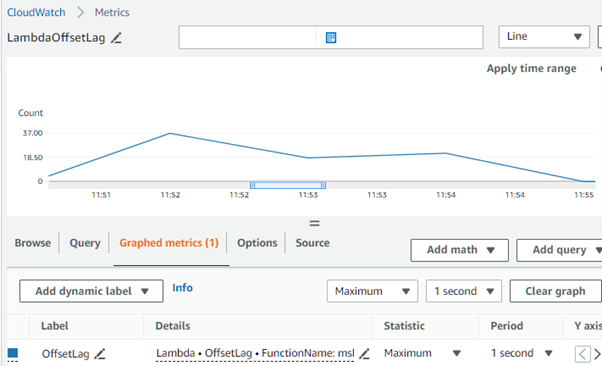
If your OffsetLag starts increasing, this may indicate issues with pollers in your function's consumer group. For more information, see Offset lag metric for Amazon MSK as an event source for Lambda.
To check how many function invocations occur in parallel, you can monitor the concurrency metrics for your function.
If you're using the Provisioned mode there's an additional ProvisionedPollers Metric which is the the number of event pollers that are actively running.
For more Lambda information, see the Lambda Operator's Guide monitoring and observability section, which includes details on specific metrics to monitor.
Monitoring Kafka metrics
Amazon MSK gathers Kafka metrics and sends them to CloudWatch. You can monitor the throughput of your Kafka topic using consumer metrics consumer_lag and consumer_offset.
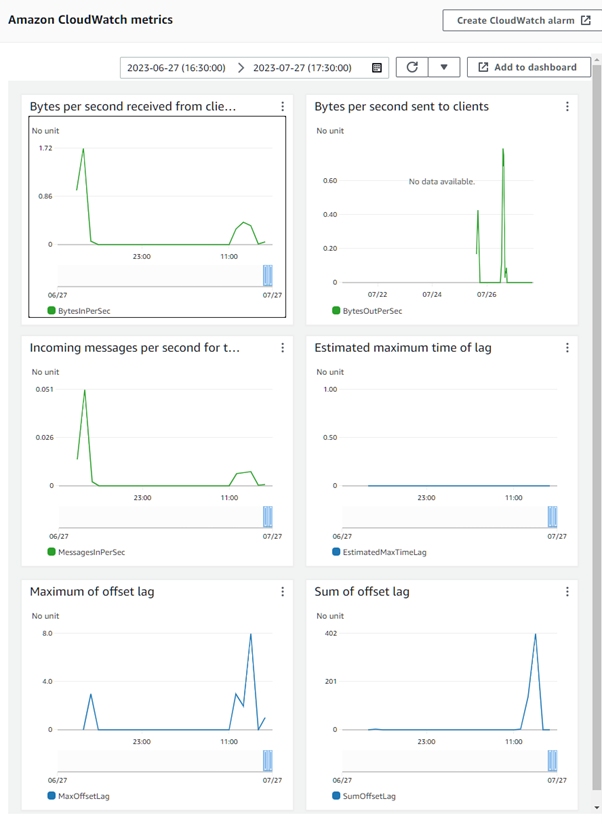
For more information about Apache Kafka metrics, including the ones that Amazon MSK surfaces, see Monitoring in the Apache Kafka documentation.
You can also monitor your MSK cluster with Prometheus, an open-source monitoring application. For information about Prometheus, see Overview in the Prometheus documentation. To learn how to monitor your cluster with Prometheus, see Open monitoring with Prometheus.
Created by: