Appendix B - AWS Step Functions in Terraform
This appendix shows how to use Terraform to provision AWS Step Functions. Step Functions are defined in Amazon States Language, (ASL). The ASL file is templitized and stored it in a directory called statemachines/.
The Terraform directory structure looks like this:
├── lambda
├── main.tf
├── modules
│   └── my-function-get-external-data_id
│       ├── eb.tf
│       ├── function
│       │   ├── lambda_my-function-get-external-data.py
│       │   └── lambda_my-function-get-external-data.py.zip
│       ├── lambda.tf
│       ├── main.tf
│       ├── statemachine
│       │   └── my-sfn-pattern.asl
│       ├── statemachine.tf
│       └── versions.tf
├── outputs.tf
├── providers.tf
├── samples
│   ├── sample-event.json
│   └── stepfunctions_graph.png
├── variables.tf
└── versions.tf
To create the Amazon EventBridge custom event bus resource, use the cloudwatch_event_bus Terraform resource.
In the eb.tf example file you can see custom event bus created with a source of my.events
IAM required policies are covered in Appendix A.
resource "aws_cloudwatch_event_bus" "my_events" {
  name = "my_events"
}
# eb rule with target and role for source "my.events"
resource "aws_cloudwatch_event_rule" "my-event-rule" {
  name           = "eb-rule-${random_string.random.id}"
  event_bus_name = aws_cloudwatch_event_bus.txn_events.name
  event_pattern  = <<EOT
{
    "source": ["my.events"]
}
EOT
  role_arn       = aws_iam_role.eb_rule_role.arn
}

resource "aws_cloudwatch_event_target" "txn-sfn-target" {
    rule           = aws_cloudwatch_event_rule.txn-event-rule.name
    arn            = aws_sfn_state_machine.GetCorrelationId.arn
    role_arn       = aws_iam_role.eb_rule_role.arn
    event_bus_name = aws_cloudwatch_event_bus.txn_events.name
}
As EventBridge is covered in previous chapters, this appendix focussed on ASL. It uses Terraform's built-in templatefile to build the resource.
You can define the Step Functions workflow using the resource aws_sfn_state_machine. This appendix does not cover creating the SNS Topic or the Lambda function.
resource "aws_sfn_state_machine" "my-sfn-pattern" {
  name       = "my-sfn-pattern-${random_string.random.id}"
  definition = templatefile("${path.module}/statemachine/my-sfn-pattern.asl",
  {
    aws_lambda_arn = aws_lambda_function.my_lambda_function.arn
    aws_sns_arn     = aws_sns_topic.notify_secops.id
  })
  role_arn   = aws_iam_role.iam_for_state_machine.arn
}
To build the ASL file you can use AWS Step Functions Workflow Studio in the AWS Console, or in your IDE, such as VS Code, using the AWS Toolkit for Visual Studio Code
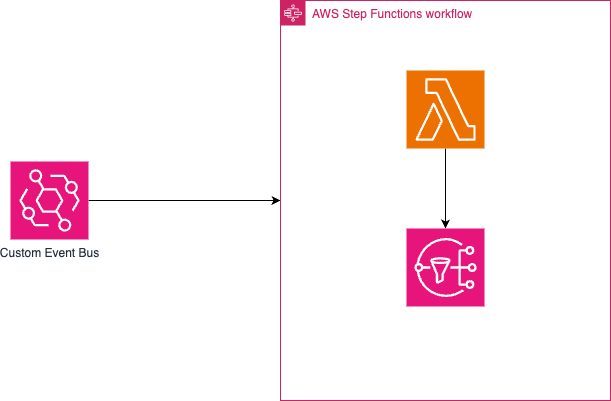
The following snippet is an example state machine definition. statemachine/my-sfn-pattern.asl The State Machine receives an event from EventBridge, sends the event to Lambda. The Lambda retrieves external data and sends the data to SNS.
{
  "Comment": "An example of the Amazon States Language for getting external data using a Lambda function.",
  "StartAt": "my-sfn-pattern",
  "States": {
    "my-sfn-pattern": {
      "Type": "Task",
      "Resource": "${aws_lambda_arn}:$LATEST",
      "Retry": [
        {
          "ErrorEquals": [
            "States.ALL"
          ],
          "IntervalSeconds": 1,
          "MaxAttempts": 3,
          "BackoffRate": 2
        }
      ],
      "InputPath": "$.detail",
      "Next": "SNS Publish"
    },
    "SNS Publish": {
      "Type": "Task",
      "Resource": "arn:aws:states:::sns:publish",
      "Parameters": {
        "Message.$": "$",
        "TopicArn": "${aws_sns_arn}"
      },
      "End": true
    }
  },
  "TimeoutSeconds": 600
}
You need to grant the Step Functions state machine IAM permission to act on the resources defined in the state machine. In this example you can see policies and a role to allow the state machine to invoke the Lambda function, and send a message to SNS.
## IAM policies to attach to role for StateMachine

data "aws_iam_policy_document" "states_assume_role" {
  statement {
    effect = "Allow"

    principals {
      type        = "Service"
      identifiers = ["states.amazonaws.com"]
    }

    actions = ["sts:AssumeRole"]
  }
}

data "aws_iam_policy_document" "invoke-lambda" {
  statement {
            effect = "Allow"
            actions = [
                "lambda:InvokeFunction"
            ]
            resources = [
                "${aws_lambda_function.my_lambda_function.arn}:*",
                "${aws_lambda_function.my_lambda_function.arn}" ]
            }
}

data "aws_iam_policy_document" "publish-sns" {
  statement {
            effect = "Allow"
            actions = [
                "sns:Publish"
            ]
            resources = [aws_sns_topic.notify_secops.arn]
            }
}

resource "aws_iam_policy" "invoke-lambda" {
    name = "InvokeLambda-${random_string.random.id}"
    policy = data.aws_iam_policy_document.invoke-lambda.json
}

resource "aws_iam_policy" "publish-sns" {
    name = "PublishSns-${random_string.random.id}"
    policy = data.aws_iam_policy_document.publish-sns.json
}

resource "aws_iam_role" "iam_for_state_machine" {
  name               = "my-sfn-pattern-${random_string.random.id}"
  assume_role_policy = data.aws_iam_policy_document.states_assume_role.json
}

resource "aws_iam_role_policy_attachment" "state-machine-lambda" {
    role = aws_iam_role.iam_for_state_machine.name
    policy_arn = aws_iam_policy.invoke-lambda.arn
}

resource "aws_iam_role_policy_attachment" "state-machine-sns" {
    role = aws_iam_role.iam_for_state_machine.name
    policy_arn = aws_iam_policy.publish-sns.arn
}
Recap
In this Appendix you learned how to:
- Create a AWS Step Functions state machine using ASL.
- Create a template file of the state machine.
- Create IAM policies to allow the state machine to interact with resources such as SNS and Lambda.
Next Steps
Learn more about using AWS Step Functions with the following workshops
Created by: