The previous chapter described how to directly integrate API Gateway with a Lambda function. With this approach, the Lambda function will be invoked synchronously each time API Gateway receives an incoming /greet request.
This chapter describes a more resilient and scalable approach, where Amazon SQS queue is used as an intermediary to decouple request intake from processing, ensuring better scalability and error-handling. This asynchronous pattern is recommended when you want to control the processing flow, and protect your downstream dependencies from overflow. For example, during the holiday season there might be tens of thousands of requests to generate greeting cards, but one of the downstream 3rd party dependencies is unable to process requests at this rate. Decoupling the workflow using an SQS queue allows the application to receive large volumes of incoming requests, buffer them in the message queue, and process at a controlled rate.
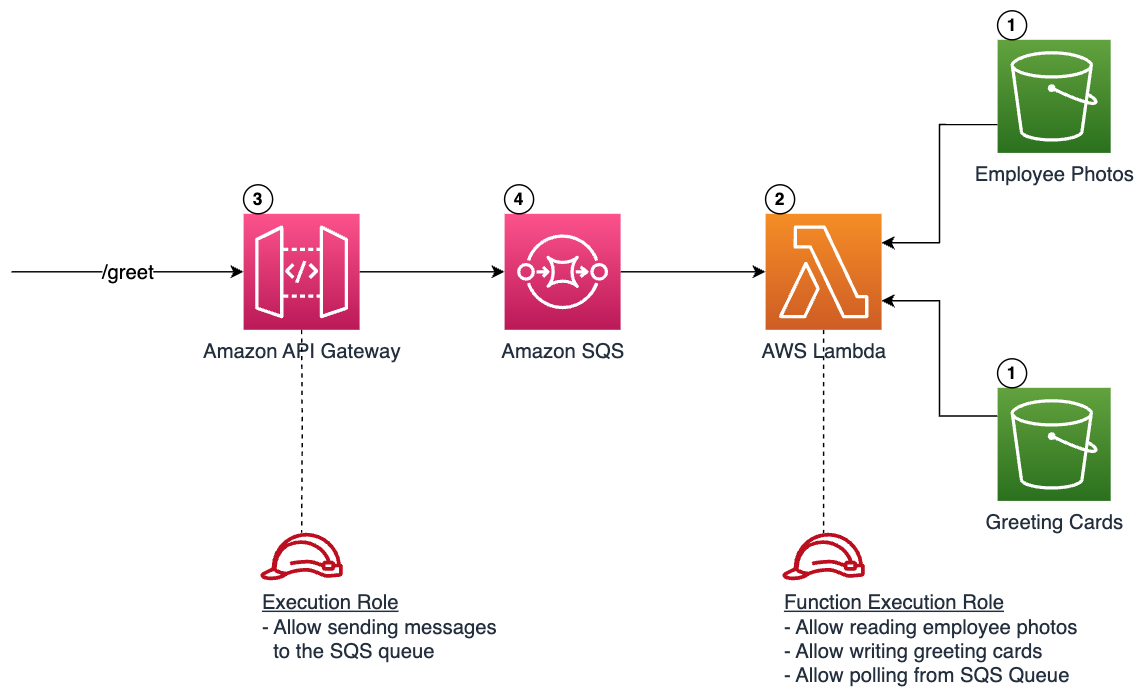
Creating an Amazon SQS queue
The following snippet creates an SQS queue. Note that data encryption is enabled for this queue for extra security.
resource "aws_sqs_queue" "greeting_queue" {
  name                    = "greetings_queue"
  sqs_managed_sse_enabled = true
}
Configuring API Gateway
The following snippet configures the API Gateway to send requests as messages to an SQS queue, instead of sending directly to a Lambda function.
# Create an IAM Role for API Gateway
resource "aws_iam_role" "api_gateway_greeting_queue_role" {
  name = "api_gateway_greeting_queue_role"

  assume_role_policy = jsonencode({
    Version = "2012-10-17",
    Statement = [
      {
        Action = "sts:AssumeRole",
        Principal = {
          Service = "apigateway.amazonaws.com"
        },
        Effect = "Allow"
        Sid    = ""
      }
    ]
  })
}

# Create a policy allowing API Gateway to send messages to the SQS queue
resource "aws_iam_role_policy" "api_gateway_greeting_queue_role_policy" {
  name = "api_gateway_greeting_queue_role_policy"
  role = aws_iam_role.api_gateway_greeting_queue_role.name

  policy = jsonencode({
    Version = "2012-10-17",
    Statement = [
      {
        Action   = "sqs:SendMessage",
        Effect   = "Allow",
        Resource = aws_sqs_queue.greeting_queue.arn
      }
    ]
  })
}

data "aws_region" "current" {}
data "aws_caller_identity" "current" {}

# Create an integration that sends incoming request body as a message to SQS
resource "aws_api_gateway_integration" "greet_method_integration" {
  rest_api_id             = aws_api_gateway_rest_api.greeting_api.id
  resource_id             = aws_api_gateway_resource.greet_resource.id
  http_method             = aws_api_gateway_method.greet_method.http_method
  type                    = "AWS"
  integration_http_method = "POST"
  uri                     = "arn:aws:apigateway:${data.aws_region.current.name}:sqs:path/${data.aws_caller_identity.current.account_id}/${aws_sqs_queue.greeting_queue.name}"
  request_parameters = {
    "integration.request.header.Content-Type" = "'application/x-www-form-urlencoded'"
  }
  request_templates = {
    "application/json" = "Action=SendMessage&MessageBody=$input.body"
  }
  credentials = aws_iam_role.api_gateway_greeting_queue_role.arn
}

resource "aws_api_gateway_integration_response" "integration_response_200" {
  rest_api_id = aws_api_gateway_rest_api.greeting_api.id
  resource_id = aws_api_gateway_resource.greet_resource.id
  http_method = aws_api_gateway_method.greet_method.http_method
  status_code = 200
  selection_pattern = "^2[0-9][0-9]" # Any 2xx response

  response_templates = {
    "application/json" = "{\"status\": \"success\"}"
  }

  depends_on = [aws_api_gateway_integration.greet_method_integration]
}

resource "aws_api_gateway_method_response" "method_response_200" {
  rest_api_id = aws_api_gateway_rest_api.greeting_api.id
  resource_id = aws_api_gateway_resource.greet_resource.id
  http_method = aws_api_gateway_method.greet_method.http_method
  status_code = 200

  response_models = {
    "application/json" = "Empty"
  }
}
Configuring Lambda event source mapping
The following snippet configures the Lambda function to poll messages from the queue for processing.
# Create a policy with permissions required to poll messages from an SQS queue
resource "aws_iam_policy" "greeting_lambda_sqs_policy" {
  name        = "greeting_lambda_ssqs_policy"
  description = "Grants access to read messages from SQS"

  policy = jsonencode({
    Version = "2012-10-17",
    Statement = [
      {
        Action = ["sqs:ReceiveMessage", "sqs:DeleteMEssage", "sqs:GetQueueAttributes"],
        Effect = "Allow",
        Resource = [aws_sqs_queue.greeting_queue.arn]
      }
    ]
  })
}

# Attach the policy to Lambda execution role created previously
resource "aws_iam_role_policy_attachment" "greeting_lambda_sqs_policy_attachment" {
  policy_arn = aws_iam_policy.greeting_lambda_sqs_policy.arn
  role       = aws_iam_role.greeting_lambda_execution_role.name
}

# Create a Lambda event-source mapping to enable Lambda to poll from the queue
resource "aws_lambda_event_source_mapping" "greeting_sqs_mapping" {
  event_source_arn = aws_sqs_queue.greeting_queue.arn
  function_name    = aws_lambda_function.greeting_lambda.function_name
  batch_size       = 1

  depends_on = [aws_iam_role_policy_attachment.greeting_lambda_sqs_policy_attachment ]
}
Deploying and testing the application in cloud
After running terraform apply to apply the changes to the cloud environment, you will see an output containing the API Gateway invocation endpoint
Outputs:

greeting_api_endpoint = "https://{api-id}.execute-api.{region}.amazonaws.com/prod/greet"
Use curl, Postman, or similar tools to send requests to the API Gateway endpoint.
curl -X POST \
     -H 'Content-Type: application/json' \
     -d '{"employeeId":"johnsmith"}' \
     https://<api-id>.execute-api.<region>.amazonaws.com/prod/greet
Replace <api-id> and <region> with the values you got in the previous step.
You will see a newly generated greeting card named greeting-card-johnsmith.html in the destination S3 bucket.
Recap
In this chapter you've learned how to:
- Create an SQS queue and set IAM permissions
- Create an API Gateway integration to send messages to the SQS queue
- Create Lambda policy to allow polling messages from the SQS queue
- Create Lambda integration to process messages from the SQS queue
- Deploy and test the API in cloud
By introducing SQS, you've enhanced our system's scalability, as well as improved its resilience and error-handling capacity.
Next Step
The next chapter will illustrate enabling observability capabilities with Terraform.
Created by: