In previous chapters, you've learned the foundational steps of constructing a serverless application IaC using a single main.tf file. In this chapter, you'll learn to elevate your IaC by transitioning from a basic one-file setup to a modular configuration. Your goal is to ensure scalability, maintainability, and the adoption of best practices that align with the demands of contemporary IT infrastructures.
In real-world scenarios, engineers would typically prefer a modular, decoupled approach to their IaC. They want to maintain the development flexibility, while ensuring operational efficiency. For example, it is common to separate resource definition and environment-specific configuration by segmenting your IaC project into different .tf files. Another common approach is to separate application logic code from IaC. This allows engineering teams to enhance agility across development, while enforcing cohesiveness throughout multiple environments and the product lifecycle.
Terraform modules
In order to support modular IaC definitions, Terraform provides support for Modules. Modules help to encapsulate resources for multiple related segments of your application. In previous chapters you've seen the main.tf file in the root working directory. This was an implicitly used root module. Modules can have input parameters, or variables, commonly defined in a variables.tf file, as well as outputs, commonly defined in an outputs.tf file, as you've seen in previous chapters.
module-root-directory/
├── variables.tf
├── main.tf
└── outputs.tf
A module can include other modules, optionally passing down variable values. This is called using a child module. The syntax for including a child module is as follows. Outputs from child modules can be accessed from the parent module.
module "child_module_name" {
  source = "./child-module-directory"
  variable1 = value1
  variable2 = value2
  ...
}
Read more about Terraform Modules in the Terraform docs.
Directory structure
It is important to understand that there's no one-size-fits-all directory structure. Depending on factors like your existing Terraform practices or your anticipated deployment model, you might already have a preferred approach in your enterprise. When designing your project directory structure, it is important to understand not only how you're going to segment your files and modules, but also why you're going to organize it in a particular way. For simplicity, in this guide we'll organize Terraform modules by resource types, while decoupling source code into its own separate directory.
Below layout can serve as a good starting point for modularizing Terraform configurations and separating application source code into its own directory:
project-root-directory/
├── terraform /
│   ├── main.tf
│   ├── variables.tf
│   ├── modules/
│   └── environments/
│
└── lambda /
    └── my-function-1/
        └── index.mjs
- The
terraform/directory holds all Terraform IaC files. You put module definitions undermodules/and different environment definitions underenvironments/. - The
lambda/directory contains your AWS Lambda functions. You would have a directory per function here, so you can add your code dependencies, such asnode_modules, and other code related artifacts.
For reusability and clarity, encapsulate each resource type in its own module. Create individual folders under modules/ for each module. It is a good idea to keep related resources like execution roles for Lambda functions in the same module as the Lambda function.
terraform/
├── modules/
│   ├── apigateway/
│   ├── lambdas/
│   ├── sqs/
│   └── storage/
│
└── environments/
Each module should have its own main.tf, variables.tf, and outputs.tf files.
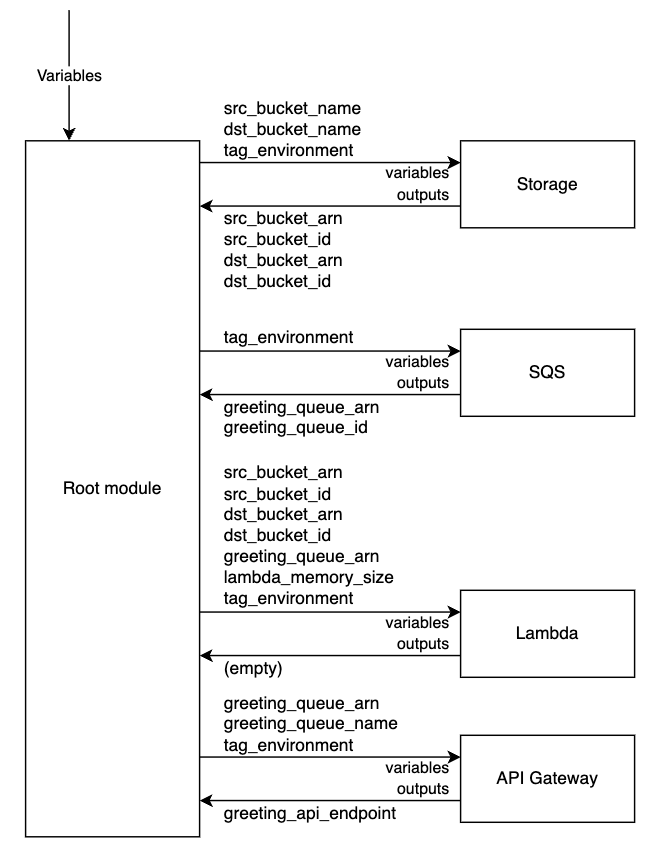
See below the outline of the storage module of the serverless application you've learned to build in previous chapters. It uses variables (variables.tf) to receive source and destination bucket names, as well as environment tag, creates required resources (main.tf), and outputs ARNs and IDs of created resources (outputs.tf). The internal logic is encapsulated within the module.
# variables.tf
variable "src_bucket_name" {
  type = string
}

variable "dst_bucket_name" {
  type = string
}

variable "tag_environment" {
  type = string
}
# main.tf
resource "aws_s3_bucket" "src_bucket" {
  bucket = var.src_bucket_name
  tags = {
    environment = var.tag_environment
  }
}

... redacted ...

resource "aws_s3_bucket" "dst_bucket" {
  bucket = var.dst_bucket_name

  tags = {
    environment = var.tag_environment
  }
}

... redacted ...
# outputs.tf
output "src_bucket_arn" {
  value = aws_s3_bucket.src_bucket.arn
}

output "src_bucket_id" {
  value = aws_s3_bucket.src_bucket.id
}

output "dst_bucket_arn" {
  value = aws_s3_bucket.dst_bucket.arn
}

output "dst_bucket_id" {
  value = aws_s3_bucket.dst_bucket.id
}
See below for a full visual representation of a modularized project structure.
Environments
Differentiating resource configurations based on environments, such as development, staging, and production, enables organizations to maintain a clean separation of concerns. Each environment can contain its specific set of defaults, configurations, and resource allocations tailored to its purpose. This segregation ensures that experimental changes do not impact live systems, provides a controlled space for testing and validation, and allows for optimal resource utilization. Moreover, it simplifies the process of environment-specific configurations, making the infrastructure more modular and easier to manage, thus streamlining the overall deployment and scaling processes.
terraform/
├── modules/
└── environments/
    ├── development/
    │   └── terraform.tfvars
    ├── staging/
    │   └── terraform.tfvars
    └── production/
        └── terraform.tfvars
Each environment directory can have its own terraform.tfvars file, which contains variable values for that specific environment.
# environments/development/terraform.tfvars
environment        = "development"
lambda_memory_size = 256
# environments/production/terraform.tfvars
environment        = "production"
lambda_memory_size = 1024
When applying the Terraform configuration, you can either explicitly pass variable values, or specify which environment variables file to use.
terraform apply \
  -var="environment=production" \
  -var="lambda_memory_size=1024"
terraform apply \
  --var-file="environments/production/terraform.tfvars"
Externalizing configurations
While it is possible to store variable configuration values in a .tfvars file, you can go one step further and externalize them to a designated cloud service. AWS Systems Manager Parameter Store (SSM) provides centralized storage for configuration data. Externalizing the values to the SSM for environment differentiation allows to ensure a reinforced boundary separation. Each environment — whether it's development, staging, or production — has its distinct set of SSM parameters. As these parameters traverse their dedicated pipelines, the pipeline role specific to a particular environment is restricted to read only that environment's SSM parameters. This method not only enhances security and confines sensitive data but also streamlines configuration management. By tightly coupling roles with their respective environment's parameters, clear boundaries are maintained, preventing inadvertent data access or overlaps, and ensuring a coherent and safeguarded deployment process.
In order to create an externalized variable value for Terraform, you need to follow three steps
- Create an SSM Parameter, for example
- Name =
/config/dev/resource-name, value =Development Resource - Name =
/config/prod/resource-name, value =Production Resource
- Retrieve SSM Parameters value, for example
# terraform/environments/dev/variables.tf
data "aws_ssm_parameter" "resource_name" {
  name = "/config/dev/resource-name"
}
# terraform/environments/prod/variables.tf
data "aws_ssm_parameter" "resource_name" {
  name = "/config/prod/resource-name"
}
variable "resource_name" {
  description = "The resource name, value is applied dynamically per environment"
  default     = data.aws_ssm_parameter.resource_name.value
}
- Pass the populated variable to relevant modules:
# terraform/environments/dev/main.tf
module "some-module" {
  source = "../../modules/some-module"
  resource_name = var.resource_name
}
This approach ensures that the configurations in each environment fetch their specific parameters from SSM, and then those parameters are passed to the modules, which in turn apply them. This maintains a clean and modular project structure.
Conclusion
The deliberate separation of resources and environments in a directory structure ensures a clear and logical organization of resources, tailored specifically for each stage of the application's lifecycle. This modular approach guarantees that changes in one environment do not inadvertently impact another, fostering safer development and deployment practices.
Furthermore, the integration of AWS Systems Manager Parameter Store (SSM) into this structure amplifies the benefits. By centralizing configuration data within SSM, you eliminate hardcoded values, thereby enhancing security and maintainability. Additionally, by pulling environment-specific parameters from SSM, you ensure that each environment is uniquely configured, further strengthening the boundaries between them.
In essence, the combination of a well-organized environment-based folder structure with the dynamic, centralized parameter management offered by SSM results in a robust, scalable, and secure infrastructure setup. It paves the way for efficient development, testing, and deployment processes, ensuring that the right configurations are always applied to the right environments.
Recap
In this chapter you've learned how to:
- Define a Terraform module
- Organize your Terraform IaC into a collection of logical modules
- Support multiple environments via
.tfvarsfiles or with the Systems Manager Parameter Store (SSM) service.
Next Steps
The next chapter will summarize this guide, as well as provide you with a collection of actionable next steps to continue your learning journey with Serverless and Terraform.
Created by: