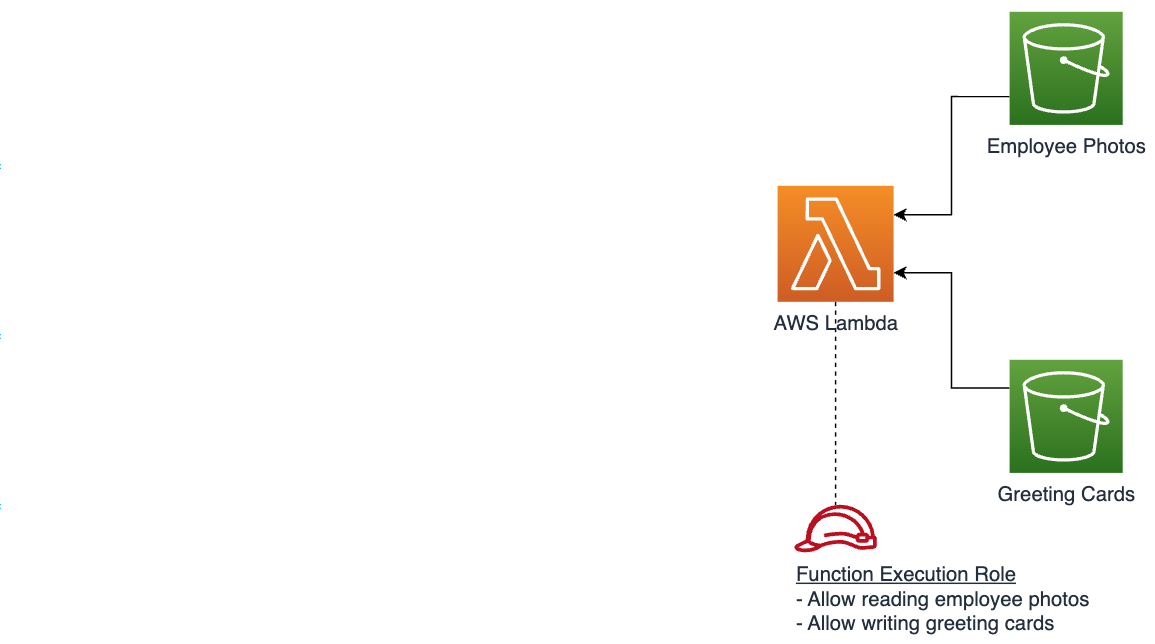
In the previous chapter you've learned how to configure and use Terraform to create the source and destination S3 buckets. In this chapter you will learn to create AWS Lambda functions. The function illustrated in this chapter processes photos from the source bucket, generates greeting cards, and uploads them to the destination bucket.
Creating IAM role and access policy
Lambda function requires an IAM execution role with relevant access permissions. Below snippet creates a role and assigns it a policy with permissions to read from the source bucket and write to the destination bucket.
# Execution role
resource "aws_iam_role" "lambda_execution_role" {
  name = "terraform-lambda-greetings-role"

  assume_role_policy = jsonencode({
    Version = "2012-10-17",
    Statement = [
      {
        Action = "sts:AssumeRole",
        Principal = {
          Service = "lambda.amazonaws.com"
        },
        Effect = "Allow",
        Sid    = ""
      }
    ]
  })
}

# Access policy
resource "aws_iam_policy" "lambda_s3_access_policy" {
  name        = "terraform-lambda-s3-access-policy"
  description = "Grants access to source and destination buckets"

  policy = jsonencode({
    Version = "2012-10-17",
    Statement = [
      {
        Action   = ["s3:GetObject"],
        Effect   = "Allow",
        Resource = [
          "${aws_s3_bucket.src_bucket.arn}/*"
        ]
      },{
        Action   = ["s3:PutObject"],
        Effect   = "Allow",
        Resource = [
          "${aws_s3_bucket.dst_bucket.arn}/*"
        ]
      }
    ]
  })
}

# Attaches the policy to the role
resource "aws_iam_role_policy_attachment" "s3_full_access_attachment" {
  policy_arn = aws_iam_policy.lambda_s3_access_policy.arn
  role       = aws_iam_role.lambda_execution_role.name
}
Creating a Lambda Function
Find the index.mjs file under Extra Resources on this page. It contains the sample source code of a Lambda function that retrieves an image from the source bucket, creates an HTML greeting card, and uploads it to the destination bucket.
Terraform provides the archive_file data type which can be used to package index.mjs into a ZIP file. This ensures that Lambda functions consistently receive the latest code version, reducing manual steps and promoting reliable, automated updates.
The code snippet below builds a ZIP archive, and uses it for creating a Lambda function. Note that two environment variables that contain references to source and destination bucket names are defined for the function. Those environment variables are used in the function code. The source_code_hash property ensures that the Lambda function resource is updated with the latest code version whenever any code changes are detected.
# Create a zip file with function code
data "archive_file" "lambda_zip" {
  type        = "zip"
  source_file = "index.mjs"
  output_path = "lambda.zip"
}

# Create a Lambda function
resource "aws_lambda_function" "greeting_lambda" {
  function_name = "greetings-lambda-function"

  handler     = "index.handler"
  runtime     = "nodejs18.x"
  memory_size = 256
  role        = aws_iam_role.lambda_execution_role.arn

  environment {
    variables = {
      SRC_BUCKET = aws_s3_bucket.src_bucket.id,
      DST_BUCKET = aws_s3_bucket.dst_bucket.id
    }
  }

  filename         = data.archive_file.lambda_zip.output_path
  source_code_hash = data.archive_file.lambda_zip.output_base64sha256
}
Run terraform apply to deploy the updated application. Running terraform plan before terraform apply is a recommended best practice to preview the changes Terraform will make based on your updated configurations.
The updated configuration uses the new
archive_filedata type, you might be asked to runterraform init --upgradeto install the required dependencies.
Testing the Lambda function locally using SAM
A common practice during development is to test the code functionality locally. Developers commonly test their code locally before transitioning to a live cloud environment. While Terraform excels in infrastructure setup, it does not natively provide support for testing Lambda functions locally. AWS SAM is a unique tool to test your Lambda function locally, ensuring everything runs smoothly before deploying to the cloud. This blog talks in detail about testing your Lambda function locally when using Terraform for IaC.
Ensure that your SAM CLI is up-to-date with the latest version. Create an event.json file with below JSON
{
  "body": "{\"employeeId\": \"johnsmith\"}"
}
Run the below command:
sam local invoke \
  --hook-name terraform \
  greeting_lambda \
  -e event.json
Output:
{
  "statusCode": 200,
  "body": "{\"message\":\"Processed successfully\"}"
}
Invoking the Lambda function running on AWS using the AWS CLI
The following snippet demonstrates how to use AWS CLI to invoke the Lambda function. It uses the same event.json file created in the previous section.
aws lambda invoke \
  --function-name greeting_lambda \
  --cli-binary-format raw-in-base64-out  \
  --payload file://event.json \
  output.txt
This will invoke the Lambda function and store the result in output.txt.
You will see a newly generated greeting card named greeting-card-johnsmith.html in the destination S3 bucket.
You can use SAM to browse the CloudWatch logs generated during function invocation
sam logs --cw-log-group /aws/lambda/greeting_lambda
Recap
In this chapter you've learned how to:
- Create a Lambda function execution role and assign access policies
- Create a Lambda function
- Test your function locally
- Invoke Lambda function in the cloud using the AWS CLI.
Next step
In the next chapter you will learn how to set up an API Gateway to expose your Lambda function, allowing external clients to invoke your function via a public API.
Created by: