The ability to invoke a Lambda function through an HTTPS request opens up many integration opportunities. This chapter will illustrate creating a public RESTful API for a Lambda function using the Amazon API Gateway, as well as testing the API locally.
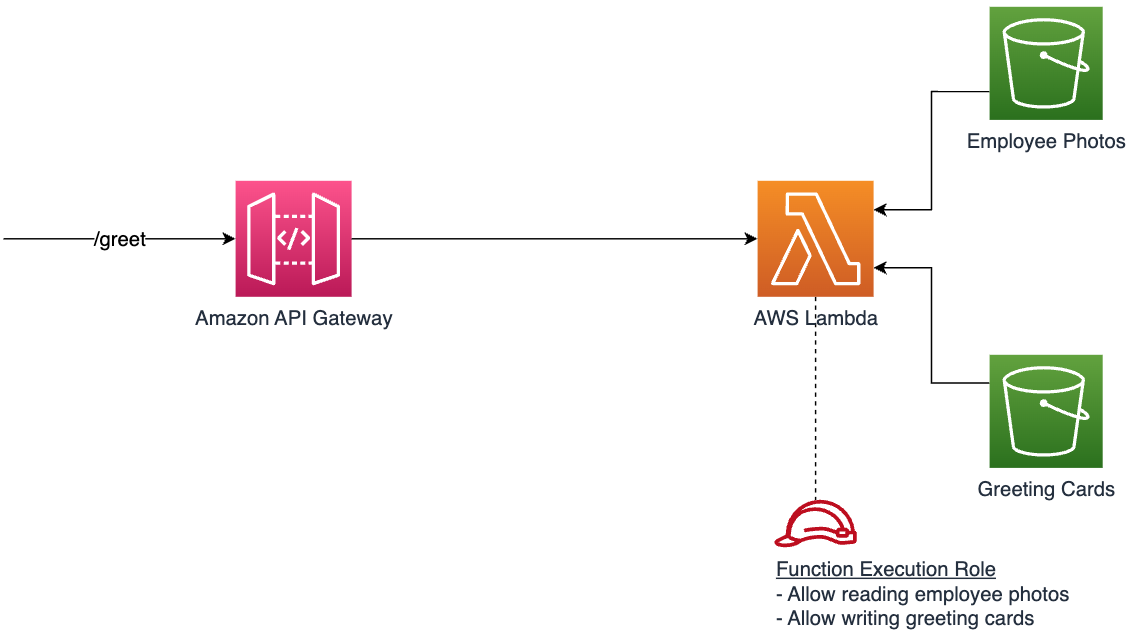
Setting up the Amazon API Gateway
The following snippet creates a regional REST API Gateway, defines a RESTful resource, sets access permissions, and integrates the resource with Lambda function.
# Create a REST API Gateway
resource "aws_api_gateway_rest_api" "greeting_api" {
  name        = "greeting_api"
  description = "API for invoking the Greeting Lambda Function"
  endpoint_configuration {
    types = ["REGIONAL"]
  }
}

# Create an API Resource
resource "aws_api_gateway_resource" "greet_resource" {
  rest_api_id = aws_api_gateway_rest_api.greeting_api.id
  parent_id   = aws_api_gateway_rest_api.greeting_api.root_resource_id
  path_part   = "greet"
}

# Create an API Method
resource "aws_api_gateway_method" "greet_method" {
  rest_api_id   = aws_api_gateway_rest_api.greeting_api.id
  resource_id   = aws_api_gateway_resource.greet_resource.id
  http_method   = "POST"
  authorization = "NONE"
}

# Grant API Gateway permissions to invoke the Lambda function
resource "aws_lambda_permission" "allow_api_gateway" {
  statement_id  = "AllowAPIGatewayInvoke"
  action        = "lambda:InvokeFunction"
  function_name = aws_lambda_function.greeting_lambda.function_name
  principal     = "apigateway.amazonaws.com"

  # This will only allow a specific API resource and method to invoke the Lambda function.
  # Otherwise any API Gateway in the account will be able to invoke the Lambda function.
  # This is required for adhering to least privileged access principle
  source_arn = "${aws_api_gateway_rest_api.greeting_api.execution_arn}/*/${aws_api_gateway_method.greet_method.http_method}${aws_api_gateway_resource.greet_resource.path}"
}

# Integrate API Gateway with the Lambda function
resource "aws_api_gateway_integration" "greet_lambda_integration" {
  rest_api_id = aws_api_gateway_rest_api.greeting_api.id
  resource_id = aws_api_gateway_resource.greet_resource.id
  http_method = aws_api_gateway_method.greet_method.http_method

  integration_http_method = "POST"
  type                    = "AWS_PROXY"
  uri                     = aws_lambda_function.greeting_lambda.invoke_arn

  depends_on = [aws_lambda_permission.allow_api_gateway]
}

# Create a new API Gateway deployment
resource "aws_api_gateway_deployment" "greeting_api_deployment" {
  rest_api_id = aws_api_gateway_rest_api.greeting_api.id
  stage_name  = "prod"

  triggers = {
    redeployment = sha256(jsonencode(aws_api_gateway_rest_api.greeting_api.body))
  }

  lifecycle {
    create_before_destroy = true
  }
  depends_on = [aws_api_gateway_method.greet_method]
}

# Output the API Gateway invocation endpoint
output "greeting_api_endpoint" {
  value = "${aws_api_gateway_deployment.greeting_api_deployment.invoke_url}/greet"
}
Running terraform apply will deploy the updated application.
Testing the API locally with SAM
Run the following command from the directory where the main.tf file is located.
sam local start-api --hook-name terraform
This is what output will look like
Mounting greeting_lambda at http://127.0.0.1:3000/greet [POST]
You can now browse to the above endpoints to invoke your functions.
You do not need to restart/reload SAM CLI while working on your
functions, changes will be reflected instantly/automatically.
If you used sam build before running local commands, you will need
to re-run sam build for the changes to be picked up. You only need
to restart SAM CLI if you update your AWS SAM template
2023-10-06 18:35:33 WARNING: This is a development server. Do not
use it in a production deployment. Use a production WSGI server
instead.
 * Running on http://127.0.0.1:3000
Use curl, Postman, or a similar tool to send requests to the local API endpoint. The API will call the local Lambda function instance which is instantiated by SAM in the local environment. To know more about how SAM makes it happen visit this url.
curl  -v http://127.0.0.1:3000/greet \
      -H 'Content-Type:application/json' \
      -d '{"employeeId":"johnsmith"}'
Deploying and testing the API in cloud environment
You can use Terraform outputs to print out the newly created API Gateway invocation endpoint.
output "greeting_api_endpoint" {
  value = "${aws_api_gateway_deployment.greeting_api_deployment.invoke_url}/greet"
}
Outputs:

greeting_api_endpoint = "https://{api-id}.execute-api.{region}.amazonaws.com/prod/greet"
Use curl, Postman, or similar tools to send requests to the API Gateway endpoint.
curl -X POST \
     -H 'Content-Type: application/json' \
     -d '{"employeeId":"johnsmith"}' \
     https://<api-id>.execute-api.<region>.amazonaws.com/prod/greet
Replace <api-id> and <region> with the values you got in the previous step.
You will see a newly generated greeting card named greeting-card-johnsmith.html in the destination S3 bucket.
Recap
In this chapter you've learned how to:
- Create a RESTful API Gateway
- Define an API Gateway resource with a POST method
- Define access permission and integrate the API Gateway with a Lambda function
- Test the API locally
- Deploy and test the API in cloud
Next Step
The next chapter will add scalability and resilience to the application architecture by introducing an SQS queue between API Gateway and Lambda function. Instead of sending requests to the Lambda function directly, the API Gateway will put messages to the queue instead, and Lambda function will process messages asynchronously by polling from the queue.
Created by: