Migrating the Node.js/Express backend is the most challenging of the layers to migrate to a serverless environment, as the server layer is a Node.js application that runs in a server.
One option for this migration is to use AWS Fargate. Fargate is a serverless container service that allows you to scale automatically and you pay as you go. Another option is to use AWS AppRunner, a container service that auto scales and you also pay as you go. However, neither of these options aligns with our migration requirements, as they don’t scale to zero.
Another option for the lift and shift migration of this Node.js application is to use AWS Lambda with AWS Lambda Web Adapter. AWS Lambda Web Adapter is an open-source project that allows a Lambda function to behave as a web server by listening for incoming HTTP/S requests, enabling you to build web applications on Lambda with familiar frameworks, like Express.js, Flask, SpringBoot. You can learn more about this project in its GitHub repository.
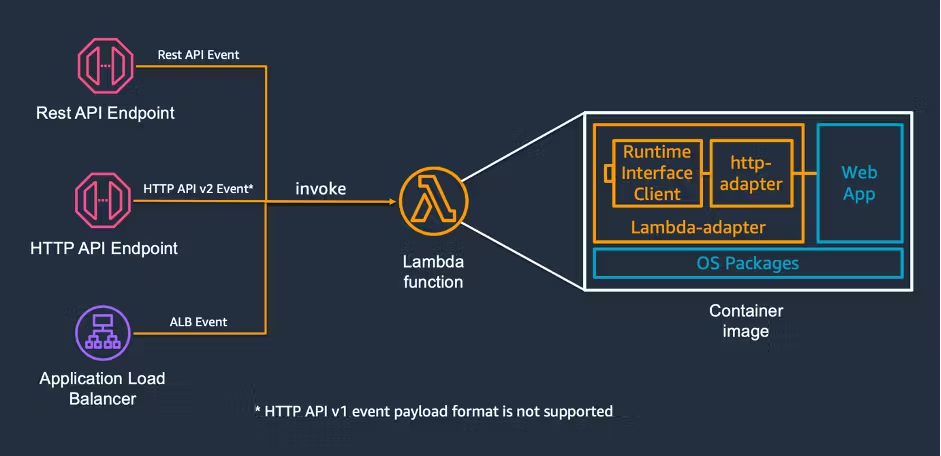
Using this project, you can create a new Lambda function that has the Express/NodeJS application as the function code. You can lift and shift all the code into the function. If you want a step-by-step tutorial on how to do this, check out this video.
const lambdaAdapterFunction = new Function(this,`${props.stage}-LambdaAdapterFunction`,
    {
        runtime: Runtime.NODEJS_16_X,
        code: Code.fromAsset('backend-app'),
        handler: 'run.sh',
        environment: {
            AWS_LAMBDA_EXEC_WRAPPER: '/opt/bootstrap',
            REGION: this.region,
            ASYNC_INIT: 'true',
        },
        memorySize: 1024,
        layers: [layerLambdaAdapter],
        timeout: Duration.seconds(2),
        tracing: Tracing.ACTIVE,
    }
);
The next step is to create an HTTP endpoint for the server application. There are three options for doing this: API Gateway, Application Load Balancer (ALB) , or to use Lambda Function URLs. All the options are compatible with Lambda Web Adapter and can solve the challenge for you.
For this demo, we will choose function URLs as they are simple to configure and one function URL forwards all routes to the Express server. API Gateway and ALB require more configuration and have separate costs, while the cost of function URLs is included in the Lambda function.
Created by: