Fetch, tail, and filter Lambda function logs locally
To simplify troubleshooting, SAM CLI has a command called sam logs. The sam logs command lets you fetch logs generated by your deployed Lambda function from the command line. In addition to printing the logs on the terminal, this command has several features to help you quickly find your bug.
NOTE: This command works for all AWS Lambda functions; not just the ones you deploy using SAM.
sam logs -n PythonTestDemo --stack-name apigw-lambda --tail
In a new terminal, send a curl command to the API Gateway endpoint and watch the log output.
curl <API Gateway url>
You can find more information and examples about filtering Lambda function logs in the SAM CLI Documentation.
Implement application tracing
You can use AWS X-Ray to track user requests as they travel through your entire application. With X-Ray, you can understand how your application and its underlying services are performing to identify and troubleshoot the root cause of performance issues and errors.
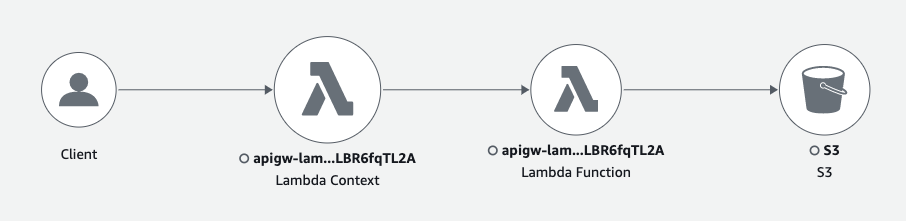
We instrumented the Lambda function handler using AWS X-Ray. To view the X-Ray traces, open the console and find your Lambda function. Navigate to Monitor -> Traces and you should see your X-Ray service map and traces.
You may also navigate to the X-Ray service in the console to examine your traces in greater detail. In the console you should be able to find a service map that looks similar to the one below.
Created by: