Learning Goals
- Learn Amazon KDS & Lambda monitoring methodologies
There are 2 monitoring levels for Kinesis data streams.
Basic (stream-level): Stream-level data is sent automatically every minute at no charge.
Enhanced (shard-level): Shard-level data is sent every minute for an additional cost. To get this level of data, you must specifically enable it for the stream using the EnableEnhancedMonitoring operation.
This allows you to monitor the hot and cold shards, example the over utilized or underutilized shards.
You can view the output of additional metrics in CloudWatch when Enhanced shard level metric is enabled.
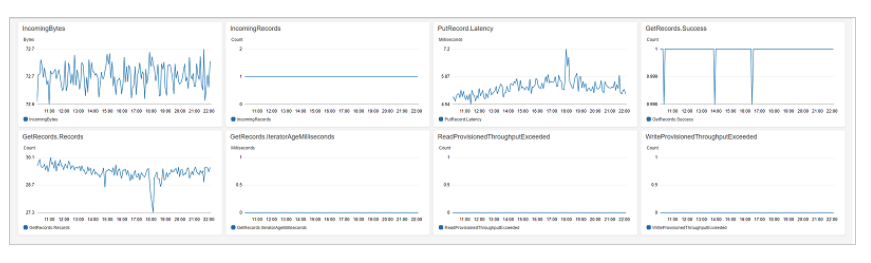
Monitor IteratorAgeMilliseconds value
When this value increases, it could be caused by one of these reasons:
- Slow record processing
- Read throttles
- AWS Lambda function error
- Connection timeout
- Uneven data distribution among shards
Please refer to IteratorAgeMilliseconds value in Kinesis Data Streams to learn more.
Kinesis Data Streams API calls in CloudTrail
Amazon KDS is integrated with AWS CloudTrail which shows/logs record of actions taken by a user, role, or an AWS service in Kinesis Data Streams. This includes code and console related calls/actions. CloudTrail captures all API calls for Kinesis Data Streams as events. If you created/configured a trail it will record it to Amazon S3 Bucket that you have specified and if not, you can still see it in the event history via console
You can configure other AWS services to further analyze and act upon the event data collected in CloudTrail logs.
CloudTrail Supported Services and Integrations
CloudTrail supports logging events for many AWS services. You can find the specifics for each supported service in that service's guide. Links to those service-specific topics are provided below. In addition, some AWS services can be used to analyze and act upon data collected in CloudTrail logs. You can browse an overview of those service integrations here.
Please refer to CloudTrail - Services and Integrations to learn more.
Please refer to Logging API Calls with CloudTrail to learn more.
Configuring Amazon SNS notifications for CloudTrail
You can enable notification by CloudTrail when new log files published to your Amazon S3 bucket. You can manage notifications using Amazon Simple Notification Service (Amazon SNS) and notifications are optional. If notifications are needed, configure CloudTrail to send update information to an Amazon SNS topic whenever a new log file has been sent. You can subscribe to the topic to receive the messages.
Please refer to CloudTrail + SNS to learn more.
Monitor using Kinesis Client Library (KCL)
KCL publishes custom Amazon CloudWatch metrics on your behalf and can be viewed from CloudWatch console. The metrics will be published using the name of your KCL application as the namespace. You can view these metrics in Custom Metrics under CloudWatch.
Please refer to Monitoring the KCL to learn more.
Lambda Monitoring
Monitor lambda concurrency metrics
The Lambda function emits concurrency metrics as an aggregate count of the number of instances processing events. This will help you to monitor if you're close to hitting concurrency limits.
The granularity for each metric is 1 minute for both following metrics:
General concurrency metrics:
ConcurrentExecutions– The number of active concurrent invocations at a given point in time.UnreservedConcurrentExecutions– The number of active concurrent invocations that are using unreserved concurrency.
Provisioned concurrency metrics: Usually, you want to track this if you have enabled provisioned concurrency and want to track the usage.
ProvisionedConcurrentExecutions– The number of execution environment instances that are actively processing an invocation on provisioned concurrency.ProvisionedConcurrentInvocations– The number of times Lambda invokes your function code using provisioned concurrency.
Please refer to Lambda function metrics to learn more.
Monitor lambda using CloudWatch
You can monitor lambda using the below options:
CloudWatch Log Insights
You can interactively search and analyze your log data in Amazon CloudWatch Logs. You can perform queries to help you more efficiently and effectively respond to operational issues. You can search and analyze log data using a specialized query syntax over multiple log groups and provides filtering using glob and regular expressions pattern matching.
CloudWatch Logs Insights provides sample queries, command descriptions, query autocompletion, and log field discovery to help you get started. Sample queries are included for several types of AWS service logs. It automatically discovers fields in logs from AWS services AWS Lambda, Amazon VPC, and any application or custom log that emits log events as JSON.
A single request can query up to 50 log groups. Note that queries time out after 60 minutes, query results are available for 7 days.
Please refer to CloudWatch Insights to learn more.
Lambda Insights
Lambda Insights collects, aggregates and summarizes system level metrics and also collects, aggregates and summarizes diagnostic information such as cold starts. You can use the multi-function overview on the Lambda Insights dashboard to identify and detect compute memory anomalies with your function. If the multi-function overview indicates that a function is using a large amount of memory, you can view detailed memory utilization metrics in the Memory Usage pane. You can then go to the Metrics dashboard to enable anomaly detection or create an alarm.
Please refer to Lambda Insights to learn more.
AWS X-Ray
You can use AWS X-Ray to visualize application components, identify performance issues, and troubleshoot requests that resulted in an error. Your Lambda functions sends trace data to X-Ray, and X-Ray processes the data to generate a service map and searchable trace summaries. You can track requests made to your applications; X-Ray can create a map of services used by your application and you can view connections among your services in your application and you can create a dependency tree and detect latency or errors.
Please refer to Debug with AWS X-Ray to learn more.
Created by: