Learning Goals
- Learn key concepts and terminologies of Amazon KDS Scaling
Kinesis Data Streams provides serverless scaling and concurrent consumers at low latency with data retention up to a year and scales horizontally. Each shard has a read throughput of up to 5 transactions per second for reads, up to a maximum total data read rate of 2 MB per second. If an application (or a group of applications operating on the same stream) attempts to get data from a shard at a faster rate, Kinesis Data Streams throttles the corresponding Get operations. If a record processor is processing data faster than the limit — such as in the case of a failover — throttling occurs.
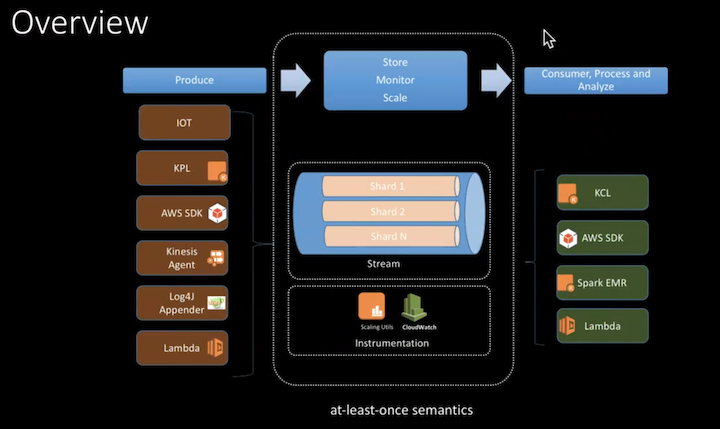
Scaling at different layers
Resharding
You can increase throughput by increasing the number of shards in your stream and it also increases the number of functions processing data from those shards, and one Lambda function invocation processes one shard at a time. At time of this writing, you can scale up to 500 shards in a stream and up to 5 lambda functions can be subscribed to a stream. The splitting and merging of shards is automatically managed by KDS for you. You are charged on a per-shard basis and splitting increases the stream cost.
Please refer to Strategies for Resharding to learn more about sharding strategies.
You can also automatically add and remove shards using application auto scaling. Please refer to Application Auto Scaling to learn more about autoscaling shards.
Lambda Parallelization Factor
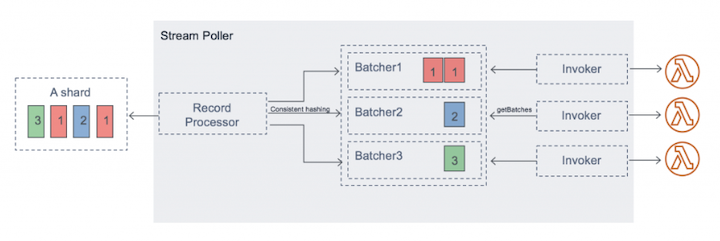
A parallelization factor is used for speeding up data processing. Concurrency can be increased by processing multiple batches from each shard in parallel. The default value is 1 and can be set up to 10. Lambda can process up to 10 batches in each shard simultaneously. Lambda ensures in-order processing at the partition key level even if you increase the number of concurrent batches per shard.
Enhanced Fan-out
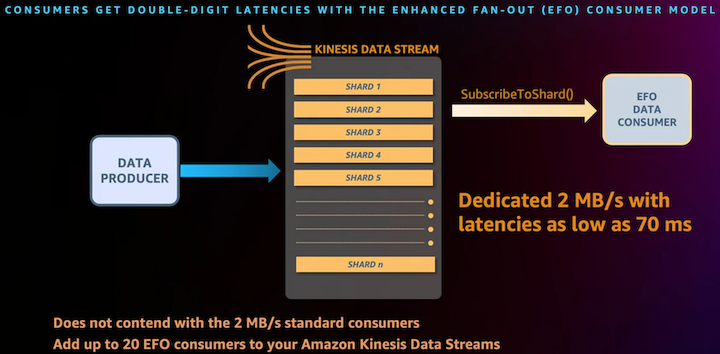
You can reduce latency and increase read throughput by creating a data stream consumer with enhanced fan-out. Stream consumers get a dedicated connection to each shard that doesn't impact other applications that are also reading from the stream. This enables consumers to receive records from a stream with a throughput up to 2 MB of data per second per shard.
The easiest way to use enhanced fan-out is by using latest Kinesis Client Library 2.0 (KCL). KCL will automatically register itself as a consumer of the stream. Then KCL will enumerate the shards and subscribe to them using the new SubscribeToShard API. It will also continuously call SubscribeToShard whenever the underlying connections are terminated.
Please refer to Consumers Enhanced Fan-Out and Blog on KDS Enhanced Fan-Out to learn more.
Lambda Batch Size
Function runtime duration is independent from the number of records in an event, so increasing the batch size decreases the lambda iterator age. If the function's duration is dependent on the number of records in an event, then increasing function's batch size doesn't decrease iterator age.
Please refer to Configuring batch size
Lambda function optimization
The following steps can be taken to optimize Lambda's performance.
Lambda execution environments
One approach to prevent cold starts is by using pinging mechanism; however, this is not a guaranteed way to reduce cold starts. Limitations to be aware of include scale up activities up to meet traffic increases or when Lambda runs your function in another Availability Zone as part of normal load balancing operations. Additionally, the Lambda service reaps execution environments regularly to keep them fresh, so it’s possible to invoke a function in between pings. In each of these cases, you may experience cold starts despite using a warming library, so consider this approach adequate for development and test environments, or low-traffic or low-priority workloads.
Please refer to Lambda Execution Environment
Optimizing static initialization
Ensuring functions only import the libraries and dependencies needed reduces cold start time. For example, if you only use Amazon Kinesis in the AWS SDK, you can require an individual service instead of the entire SDK.
Please refer to Static Initialization
Memory and computing power
Increasing the amount of memory allocated to the function and optimizing your function code reducde the required amount of processing time. Please refer to Configuring Lambda Memory to learn more.
Architecture and Best Practices
You can focus on the Lambda execution lifecycle for the most impact to cold starts. Example initialization code outside the handler, and the handler code. Please refer to Optimization Best Practices to learn more.
Please refer to Lambda Architecture and Best Practices to learn more.
Lambda concurrency limit
Concurrency is the in-flight requests AWS Lambda function is handling at the same time. For each concurrent request, Lambda provisions a separate instance of execution environment. When your functions receive more requests, it automatically scales execution environments as needed up to the account's concurrency limit. The default concurrency limit is 1,000 across all functions in a region.
Calculation for concurrency. Concurrency = (average requests per second) * (average request duration in seconds)
Provisioned concurrency allocates pre-initialized execution environments for your function. These execution environments are prepared to respond immediately to incoming function requests and the do incur extra charges for dedicated capacity. Benefits of provisioned concurrency include:
- Setting a floor on minimum number of execution environments
- Pre-warming execution environments to reduce cold start impact
Reserved concurrency is the maximum number of concurrent instances you want to allocate to your function. When a function has reserved concurrency, no other function can use that concurrency. There is no charge for configuring reserved concurrency.
Please refer to Configuring Reserved concurrency to learn more.
Created by: