As previously mentioned, AWS Config is a useful tool to find and fix non-compliant AWS Serverless resources. Every change you make to your serverless resources is recorded in AWS Config. Additionally, AWS Config allows you to store configuration snapshot data on S3. You can use Amazon Athena and Amazon QuickSight to make dashboards and see AWS Config data. During the detective control walkthrough we discussed how we can visualize a certain configuration like Lambda layers. This section extends on these concepts.
Visibility into AWS Lambda Configurations
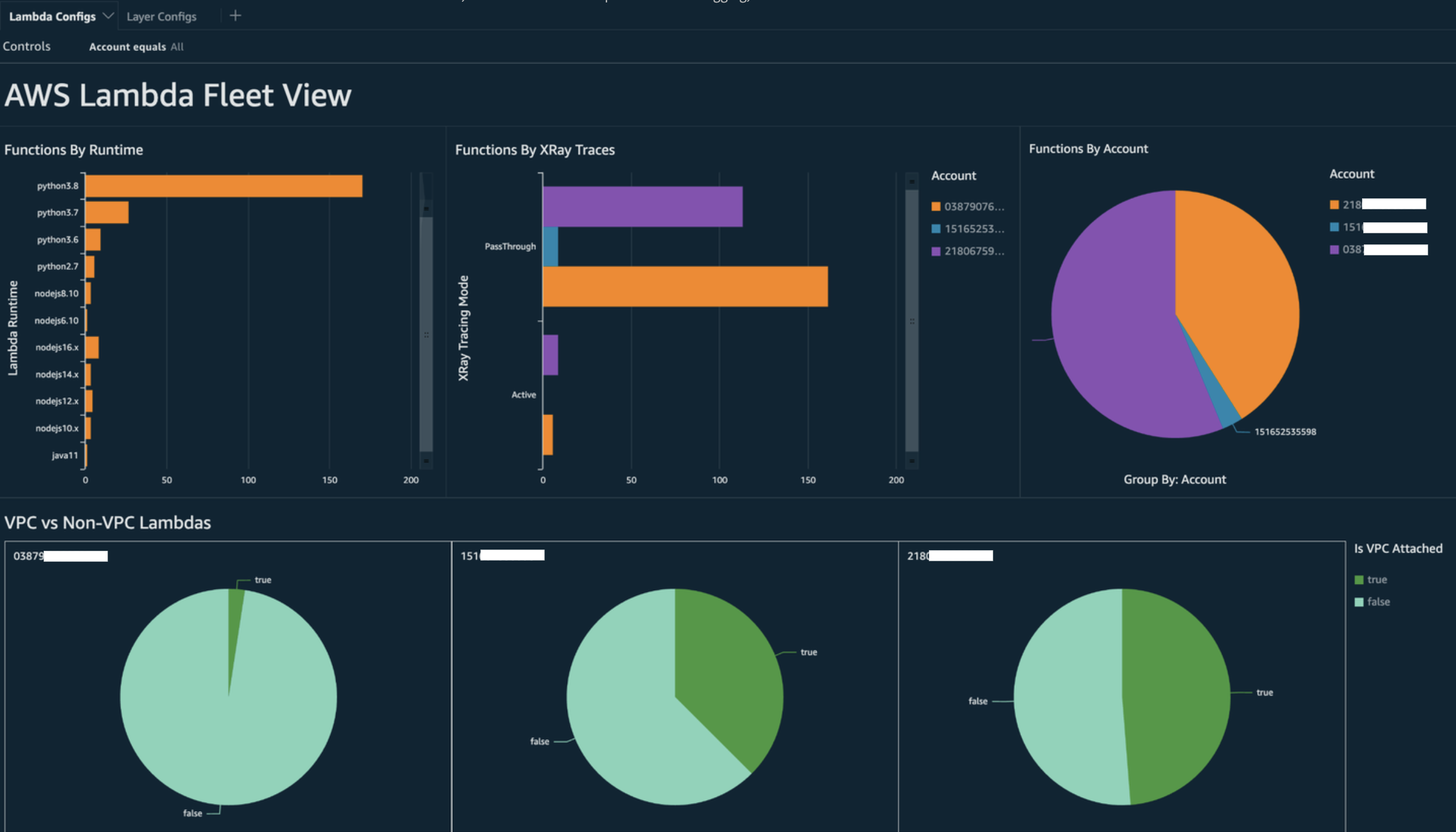
We can use the similar queries to pull other important configurations like X-Ray settings, VPC configurations, and function runtimes. Here is a sample query you can use to pull this information from Athena:
WITH unnested AS (
  SELECT
    item.awsaccountid AS account_id,
    item.awsregion AS region,
    item.configuration AS lambda_configuration,
    item.resourceid AS resourceid,
    item.resourcename AS resourcename,
    item.configuration AS configuration,
    json_parse(item.configuration) AS lambda_json
  FROM
    default.aws_config_configuration_snapshot,
    UNNEST(configurationitems) as t(item)
  WHERE
    "dt" = 'latest'
    AND item.resourcetype = 'AWS::Lambda::Function'
)

SELECT DISTINCT
  account_id,
  tags,
  region as Region,
  resourcename as FunctionName,
  json_extract_scalar(lambda_json, '$.memorySize') AS memory_size,
  json_extract_scalar(lambda_json, '$.timeout') AS timeout,
  json_extract_scalar(lambda_json, '$.runtime') AS version
  json_extract_scalar(lambda_json, '$.vpcConfig.SubnetIds') AS vpcConfig
  json_extract_scalar(lambda_json, '$.tracingConfig.mode') AS tracingConfig
FROM
  unnested
This query pulls the following data for your functions: AWS account ID, Region, VPC configuration, X-Ray tracing configuration, memory size, runtime, tags.
You can use the query to build a QuickSight dashboard and visualize the data. To aggregate AWS resource configuration data, create tables in Athena, and build QuickSight dashboards on the data from Athena, refer to this blog post. Notably, this query also retrieves tag information for the functions. This allows for deeper insights into your workloads and environments, especially if you employ custom tags.
For more information on actions you can take, refer to the “Addressing the observability findings” section below.
Visibility into AWS Lambda Compliance by AWS Config rules
With the data that is generated by AWS Config, you can create organizational-level dashboards to monitor compliance to organizational compliance policies. This allows for consistent tracking and monitoring of:
- Compliance packs by compliance score
- Rules by non-compliant resources
- Compliance status
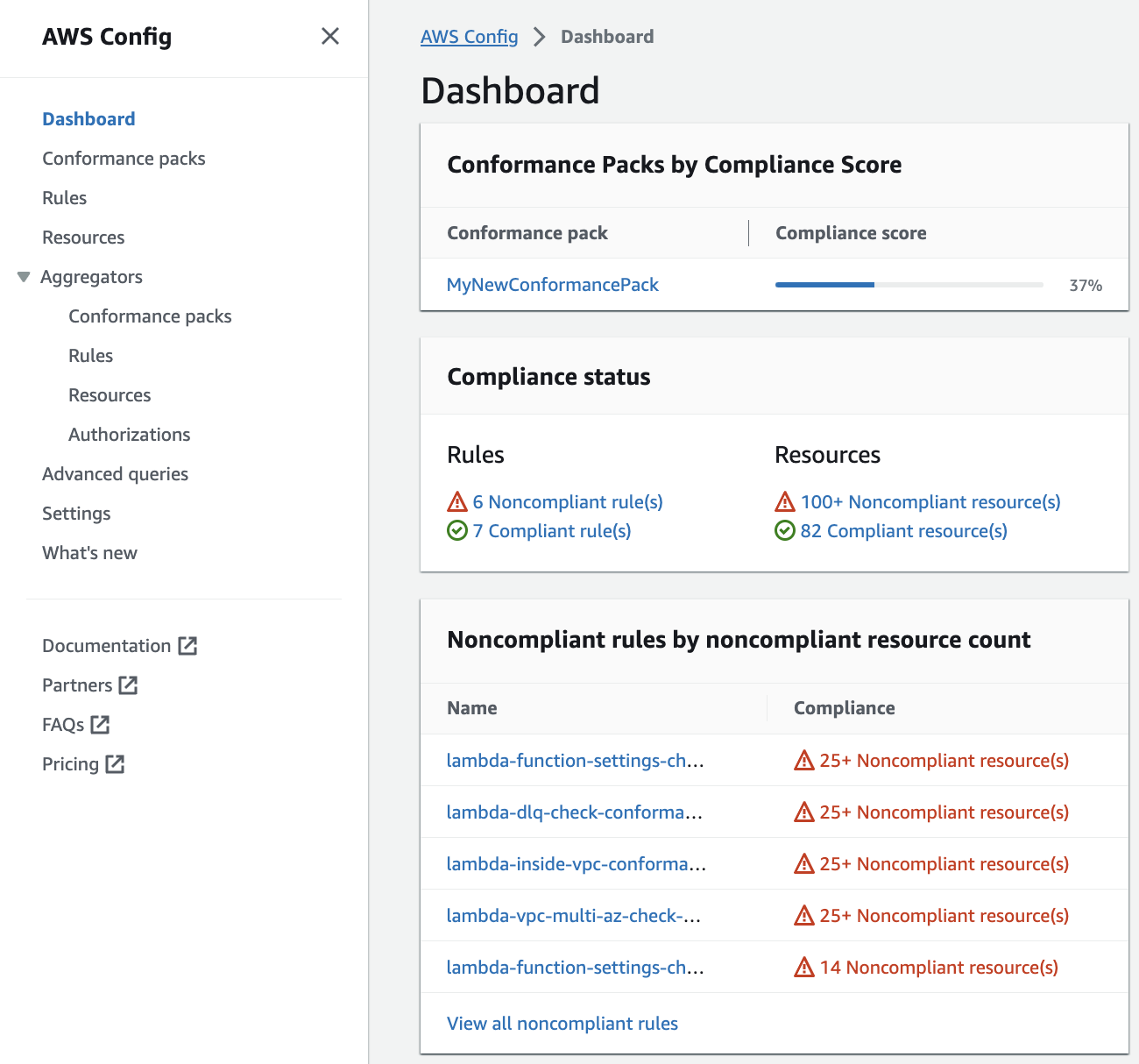
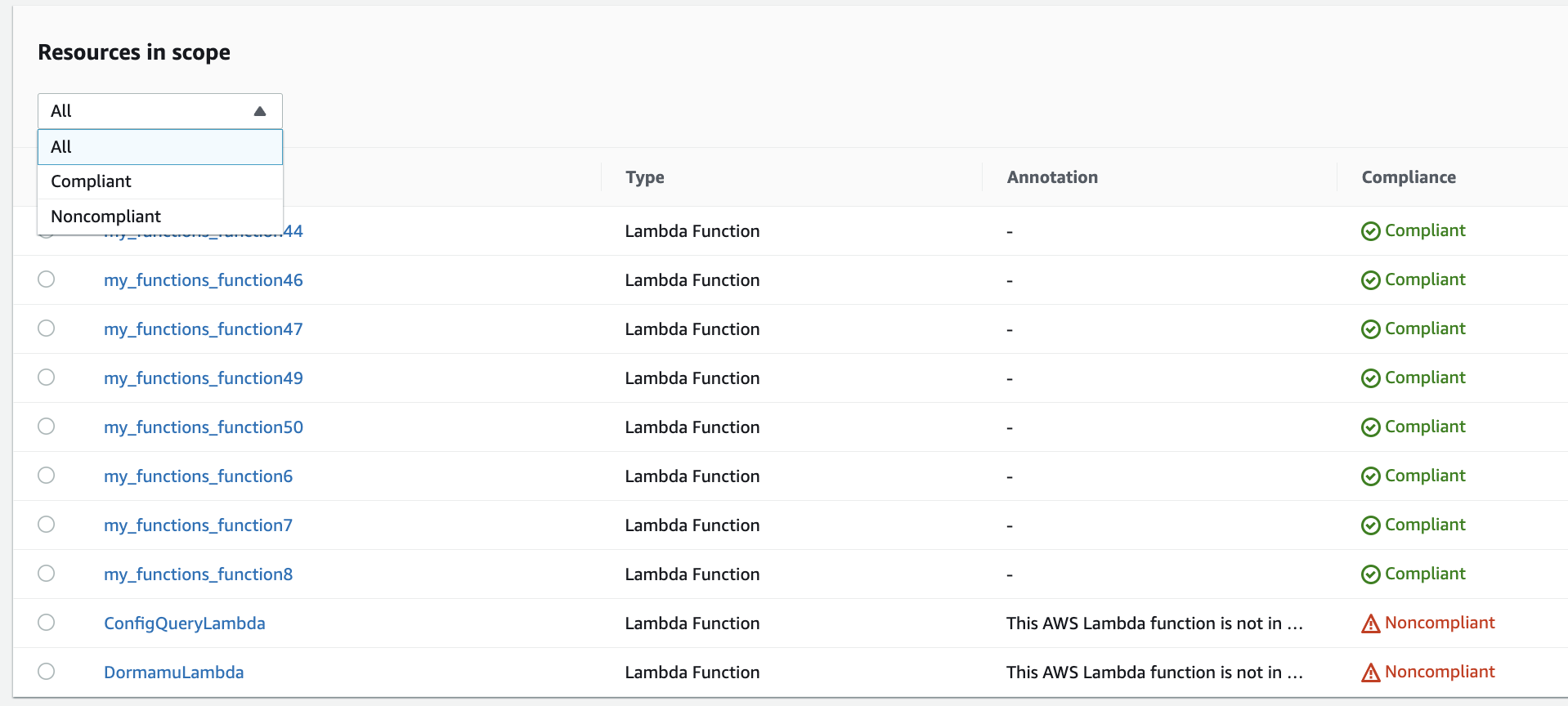
Further you can drill down on each rule to identify non-compliant resources for that rule. For example, If your organization mandates that all Lambda functions must me associated to a VPC and if you have deployed an AWS Config rule to identify compliance against that mandate, you can click on the “lambda-inside-vpc” rule from the list above:
For more information on actions you can take, refer to the “Addressing the observability findings” section below.
Visibility into your Lambda function boundaries using Security Hub
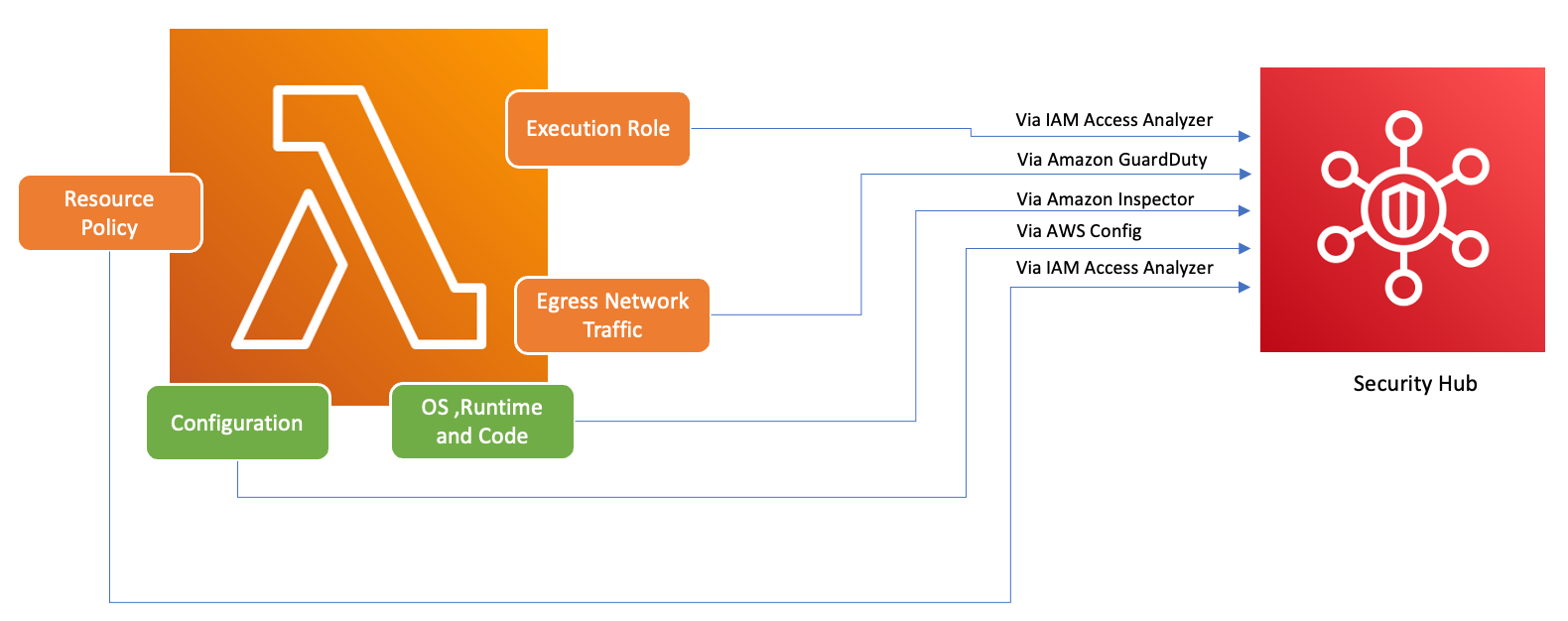
To ensure that AWS services, including AWS Lambda, are used securely, AWS introduced the Foundational Security Best Practices v1.0.0. This set of best practices provides clear guidelines for securing resources and data in the AWS environment, emphasizing the importance of maintaining a strong security posture. The AWS Security Hub complements this by offering a unified security and compliance center. It aggregates, organizes, and prioritizes security findings from multiple AWS services like Amazon Inspector, IAM Access Analyzer and Amazon GuardDuty helping users to align with the best practices and swiftly address potential security concerns.
If you have AWS Security Hub, Amazon Inspector, IAM Access Analyzer, and Amazon GuardDuty enabled within your AWS organization, Security Hub automatically aggregates findings from these services. For instance, let's consider Amazon Inspector. Using Security Hub, you can efficiently identify code and package vulnerabilities in Lambda functions. In the Security Hub console, navigate to the bottom section labeled "Latest findings from AWS Integrations." Here, you can view and analyze findings sourced from various integrated AWS services.
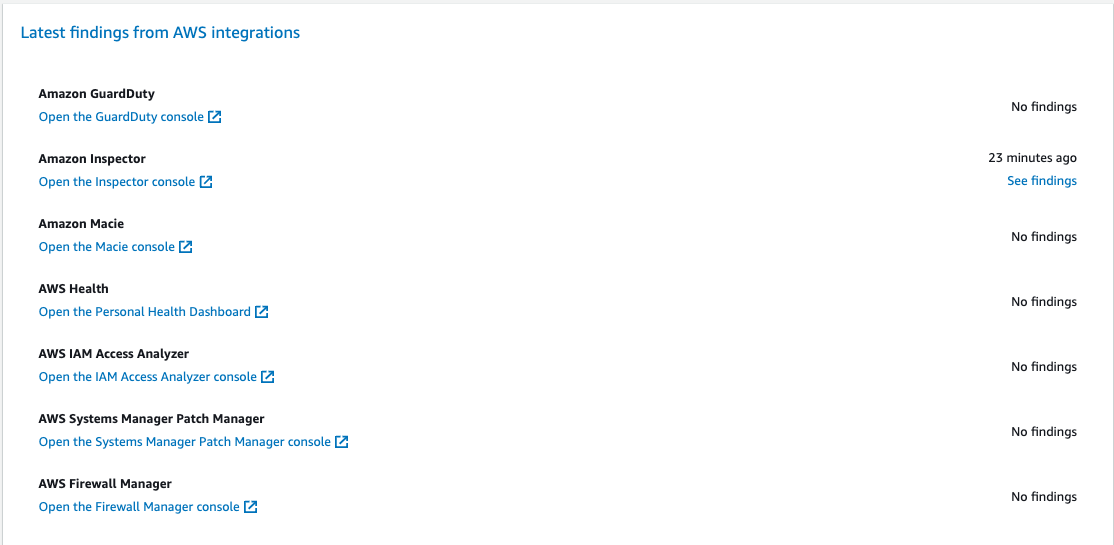
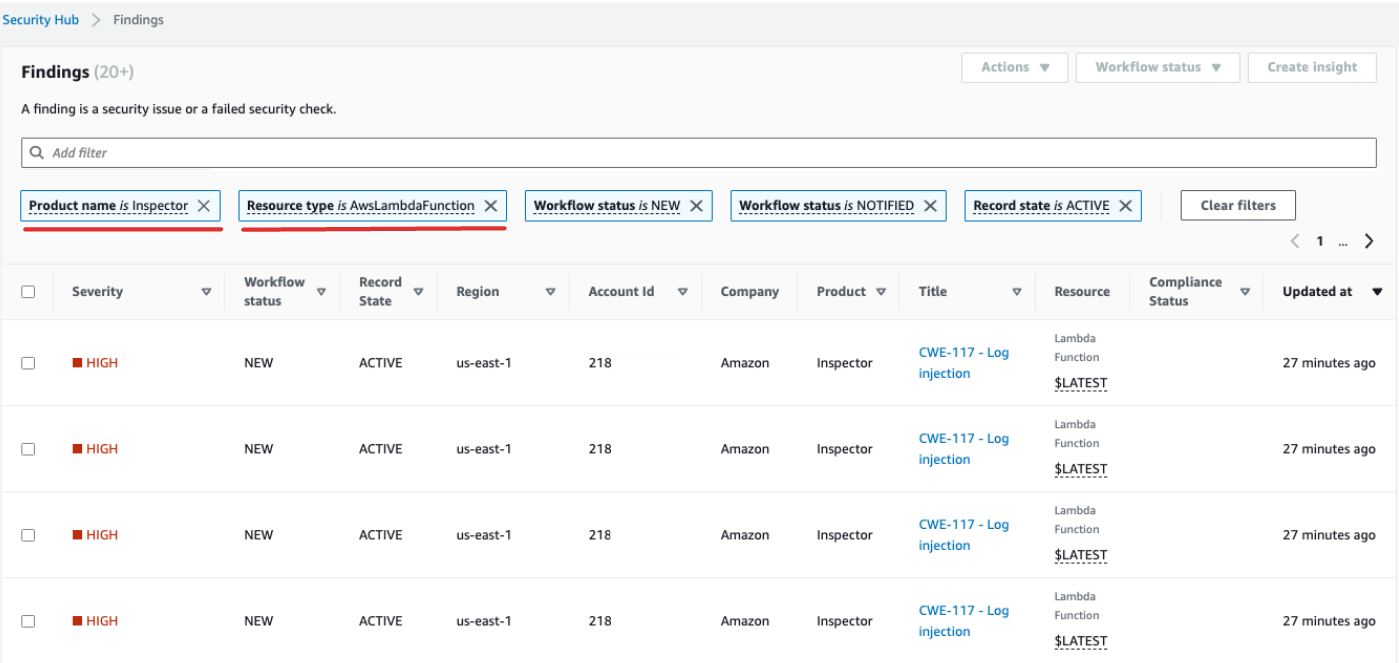
To delve deeper into each finding, click on the blue "See Findings" link in the second column. This displays a list of findings filtered by product, such as Amazon Inspector. To narrow down your search specifically for AWS Lambda functions, apply an additional filter in the findings section: set "ResourceType" to "AwsLambdaFunction". This showcases all the findings from Inspector related to Lambda functions.
For Amazon GuardDuty, you can drill down to identify suspicious network traffic patterns. Such anomalies might suggest the existence of potentially malicious code within your Lambda function.
With AWS IAM Access Analyzer, you can delve into policies, especially those with condition statements, that grant function access to external entities. Moreover, IAM Access Analyzer evaluates permissions set when using the AddPermission operation in the AWS Lambda API alongside an EventSourceToken.
Addressing the observability findings
Given the wide-ranging configurations possible for Lambda functions and their distinct requirements, a standardized automation solution for remediation might not suit every situation. Additionally, changes are implemented differently across various environments. If you encounter any configuration that seems non-compliant, consider the following guidelines:
- Tagging Strategy: We suggest implementing a comprehensive tagging strategy. Each Lambda function should be tagged with key information such as:
- Owner: The person/team responsible for the function.
- Environment: Production, Staging, Development, Sandbox.
- Application: A broader context to which this function belongs, if applicable.
- Owner Outreach: Instead of automating the breaking changes (like VPC configuration adjustment), you will proactively reach out to the owners of non-compliant functions (using the Owner tag) providing them sufficient time to either:
- Adjust non-compliant configuration on Lambda functions
- Asking for explanation if the need exceptions or refine the compliance standards.
- Maintain a CMDB (Configuration Management Database): While tags can provide immediate context, maintaining a centralized CMDB can provide deeper insights. It can hold more granular information about each Lambda function, its dependencies, and other critical metadata. It'll be an invaluable resource when it comes to auditing, compliance checks, and reaching out to function owners for any operational needs.
As the landscape of serverless infrastructure continually evolves, it's essential to adopt a proactive stance towards monitoring. With tools like AWS Config, Security Hub, and Amazon Inspector, potential anomalies or non-compliant configurations can be swiftly identified. However, tools alone cannot ensure total compliance or optimal configurations. It's crucial to pair these tools with well-documented processes and best practices.
- Feedback Loop: Once remediation steps are undertaken, ensure there's a feedback loop. This means periodically revisiting non-compliant resources to confirm if they've been updated or are still running with the same issues.
- Documentation: Always document the observations, actions taken, and any exceptions granted. Proper documentation not only helps during audits but also aids in enhancing the process for better compliance and security in the future.
- Training and Awareness: Ensure that all stakeholders, especially Lambda function owners, are regularly trained and made aware of best practices, organizational policies, and compliance mandates. Regular workshops, webinars, or training sessions can go a long way in ensuring everyone is on the same page when it comes to security and compliance.
In conclusion, while tools and technologies provide robust capabilities to detect and flag potential issues, the human element – understanding, communication, training, and documentation – remains pivotal. Together, they form a potent combination to ensure that your AWS Lambda functions and broader infrastructure remain compliant, secure, and optimized for your business needs.
Created by: