Amazon Inspector is a vulnerability management service that continually scans workloads for known software vulnerabilities and unintended network exposure. Amazon Inspector creates a finding that describes the vulnerability, identifies the affected resource, rates the severity of the vulnerability, and provides remediation guidance.
Amazon Inspector support for AWS Lambda functions provides continuous, automated security vulnerability assessments for Lambda functions and layers. Amazon Inspector provides two scan types for Lambda:
- Lambda standard scanning (default): scans application dependencies within a Lambda function and its layers for package vulnerabilities.
- Lambda code scanning: scans the custom application code in your functions and layers for code vulnerabilities. You can either activate Lambda standard scanning or activate Lambda standard scanning together with Lambda code scanning.
To enable Amazon Inspector, you can navigate to the Amazon Inspector console, expand the Settings section, and choose Account Management. On the Accounts tab, choose Activate, and then select one of two scan options provided.
You can enable Amazon Inspector for multiple accounts and delegate permissions to manage Amazon Inspector for the organization to specific accounts while setting up Amazon Inspector. While enabling, you need to grant Amazon Inspector permissions by creating the Role: AWSServiceRoleForAmazonInspector2. The Amazon Inspector console allows you to create this role using a one-click option.
For Lambda standard scanning, Amazon Inspector initiates vulnerability scans of Lambda functions in the following situations:
- As soon as Amazon Inspector discovers an existing Lambda function.
- When you deploy a new Lambda function to the Lambda service.
- When you deploy an update to the application code or dependencies of an existing Lambda function or its layers.
- Whenever Amazon Inspector adds a new common vulnerabilities and exposures (CVE) item to its database, and that CVE is relevant to your function.
For Lambda code scanning, Amazon Inspector evaluates your Lambda function application code using automated reasoning and machine learning that analyzes your application code for an overall security compliance. If Amazon Inspector detects a vulnerability in your Lambda function application code, Amazon Inspector produces a detailed Code Vulnerability type finding. For a list of possible detections, see the CodeGuru Detector Library.
To view the findings, go to the Amazon Inspector console and then on the Findings menu, choose “By Lambda function” to display the security scan results that were performed on Lambda functions.
To exclude a Lambda function from Lambda standard scanning, tag the function with the following key-value pair:
Key:InspectorExclusionValue:LambdaStandardScanning
To exclude a Lambda function from Amazon Inspector, Lambda code scans tag the function with the following key-value pair:
Key:InspectorCodeExclusionValue:LambdaCodeScanning
For example, as shown in below image, Amazon Inspector automatically detects the vulnerabilities and categorizes the findings of type Code Vulnerability, which indicates that the vulnerability is in the code of the function, and not in one of the code-dependent libraries. You can check these details for a specific function or across multiple functions at once.
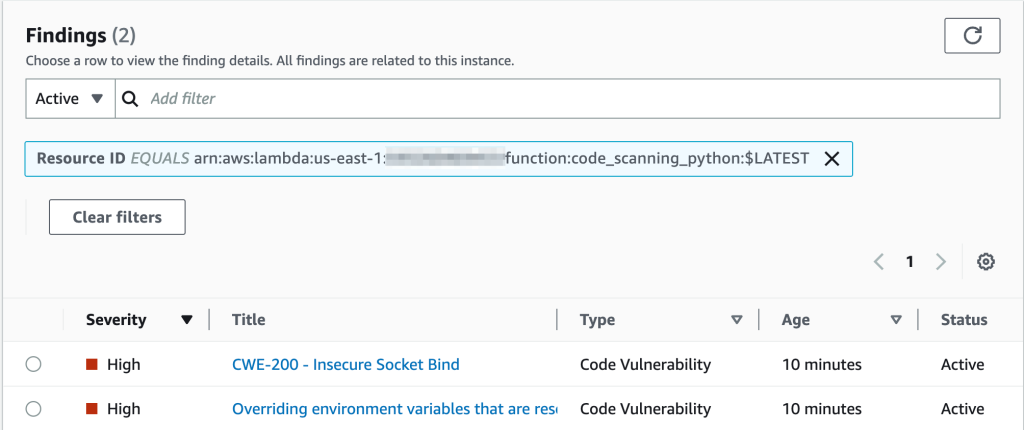
You can further dive deep into each of these findings and learn how to remediate the issue.
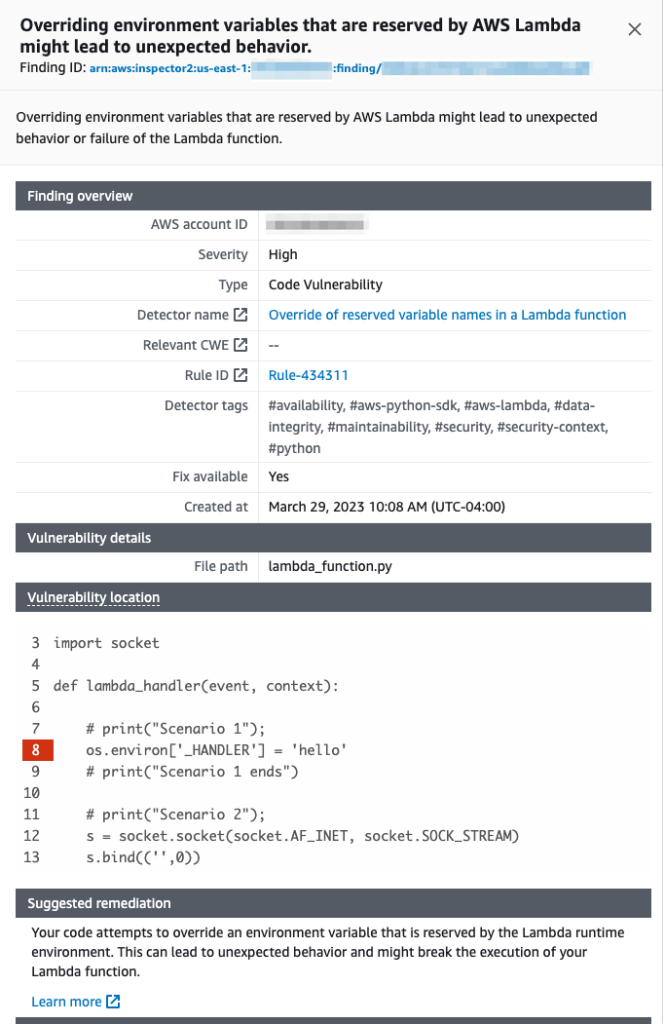
While working with your Lambda functions, ensure that you comply with the naming conventions for your Lambda functions. Refer the Lambda environment variables best practices here.
You are responsible for the remediation suggestions that you accept. Always review remediation suggestions before accepting them. You may need to make edits to remediation suggestions to ensure that your code does what you intended.
References:
Created by: