Micronaut is a modern JVM-based, full stack framework for building modular, easily testable microservice and Serverless applications. Micronaut is natively Cloud-native and supports ahead-of-time (AOT) compilation. It has smaller startup time and minimal memory footprint. Due to AOT, a majority of framework logic is computed at compilation time. Micronaut eliminates reflection, runtime proxies, dynamic class loading, and type erasure problems. In addition, Micronaut has the following abilities:
- Supports GraalVM native images out-of-the-box
- Lambda SnapStart support
- Certifies for Amazon Corretto
- AWS CDK support
You can launch a Micronaut application planned to run on AWS Lambda. Applications created from Micronaut launch page for AWS Lambda come with Lambda SnapStart support by default.
Micronaut AWS
Micronaut AWS provides integration between Micronaut application and AWS services like Amazon DynamoDB, Amazon S3, Amazon SQS, Amazon SNS, and more.
Micronaut AWS also supports distributed configuration via services such as AWS Secrets Manager and AWS Parameter Store.
With a simple config like below in src/main/resources/bootstrap.yaml file you can enable a configuration client:
micronaut:
  config-client:
    enabled: true
Assuming you have used Secrets Manager for your RDS database secrets using AWS CDK as below:
Secret rdsSecret = new Secret(this, "RDSSecret", SecretProps.builder()
  .secretName("/config/application/rds")
  .generateSecretString(SecretStringGenerator.builder()
    .excludePunctuation(true)
    .passwordLength(16)
    .generateStringKey("password")
    .secretStringTemplate("{\"username\": \"" + DBConstants.DB_USER_NAME + "\"}")
    .build())
  .build());
You can create a datasource directly using the distributed configuration that can read the values corresponding to the keys present in Secrets Manager configuration.
micronaut:
  config-client:
    enabled: true

datasources:
  default:
    url: jdbc:mysql://${RDS_PROXY_ENDPOINT}:${port}/${dbname}
    driverClassName: com.mysql.cj.jdbc.Driver
    username: ${username}
    password: ${password}
    dialect: MYSQL
    schema-generate: CREATE
    maximum-pool-size: 1
This is a very powerful feature because it abstracts the movements of secrets and credentials by directly utilizing AWS Secrets Manager on your behalf.
The code below shows how to provision a Java-based Lambda function built on Micronaut as GraalVM native image using AWS CDK:
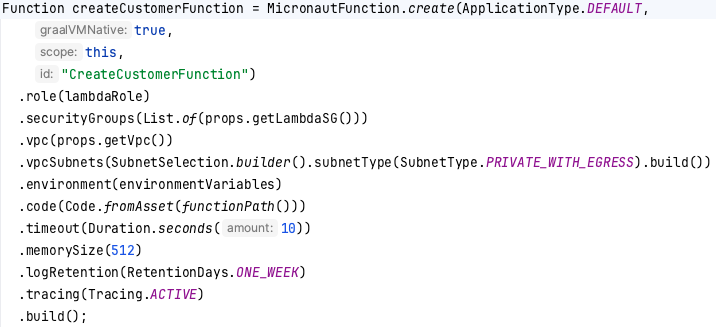
You can learn more about building Micronaut application on AWS Lambda from the following GitHub samples:
Created by: