Migrating to Graviton2 processors for AWS Lambda functions is easy as clicking a radio button in the AWS Management console.
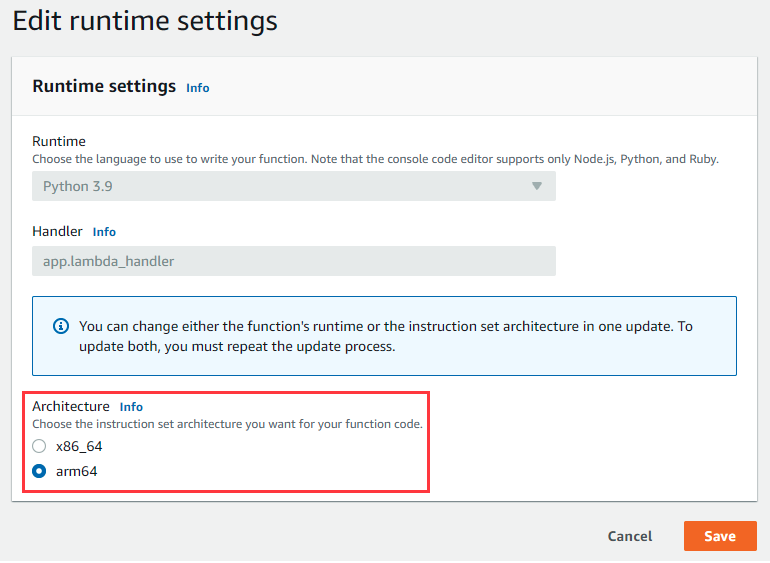
You edit the underlying architecture from x86_64 to arm64 and save. That's it. Future invocations of the Lambda
functions will use Graviton2 processors that allow you to get up to 34% better price performance. You can use Lambda SnapStart
with Graviton2 processors too.
AWS SAM
You can enable Graviton2 in SAM template as following:
MyArmFunction:
  Type: AWS::Lambda::Function
  Properties:
    Runtime: nodejs18.x
    Code: src/
    Architectures:
  	  - arm64
    Handler: lambda.handler
    MemorySize: 512
Visualize Graviton2 savings in AWS Lambda Power Tuning tool
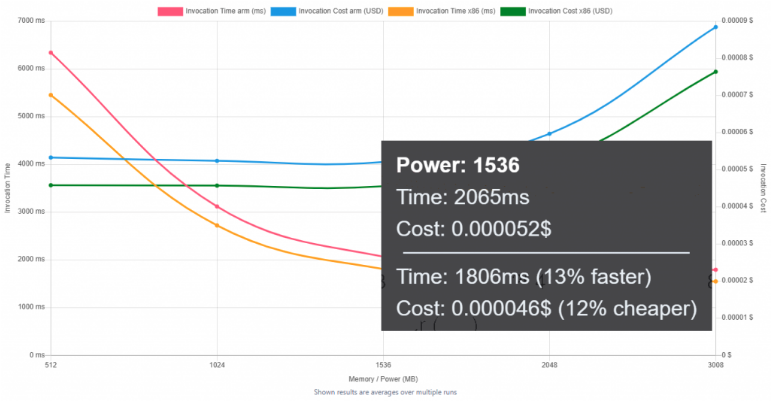
The AWS Lambda Power Tuning open-source project runs your functions using different settings to suggest a configuration to minimize costs and maximize performance. The tool allows you to compare two results on the same chart and incorporate arm64-based pricing. This is useful to compare two versions of the same function, one using x86 and the other arm64.
For example, you can compare the performance of the x86_64 and arm64 Lambda functions and see that the arm64 Lambda function is 12% cheaper to run:
Considerations
If your Java-based Lambda functions don’t use architecture-specific binaries, including in their dependencies, you can switch from one architecture to the other.
Created by: