In this module, we will be using kubectl to deploy Crossplane Resource Definitions (XRDs), Compositions, and a Claim in order to create and deploy the resources for the serverless application.
Implementation
Deploy XRDs and Compositions
Navigate to the following directory:
cd examples/upbound-aws-provider/composite-resources/serverless-examples/sqs-lambda-s3/
Examine and apply the kustomization.yaml file to create Crossplane XRDs and Compositions using the following command:
kubectl apply -k .
Verify the XRDs
kubectl get xrds
Expected output
NAME                                   ESTABLISHED   OFFERED   AGE
eventsourcemappings.awsblueprints.io   True                    5m
iampolicies.awsblueprints.io           True                    5m
xlambdafunctions.awsblueprints.io      True          True      5m
xobjectstorages.awsblueprints.io       True          True      5m
xqueues.awsblueprints.io               True          True      5m
xserverlessapp.awsblueprints.io        True          True      5m
Verify the Compositions
kubectl get compositions
Expected output. Note: the output might contain more compositions but these are the ones uses by the claim in the next step
NAME                                                  XR-KIND              XR-APIVERSION               AGE
container.lambda.aws.upbound.awsblueprints.io         XLambdaFunction      awsblueprints.io/v1alpha1   5m
read-s3.iampolicy.awsblueprints.io                    IAMPolicy            awsblueprints.io/v1alpha1   5m
read-sqs.iampolicy.awsblueprints.io                   IAMPolicy            awsblueprints.io/v1alpha1   5m
s3bucket.awsblueprints.io                             XObjectStorage       awsblueprints.io/v1alpha1   5m
sqs.esm.awsblueprints.io                              EventSourceMapping   awsblueprints.io/v1alpha1   5m
sqs.queue.aws.upbound.awsblueprints.io                XQueue               awsblueprints.io/v1alpha1   5m
write-s3.iampolicy.awsblueprints.io                   IAMPolicy            awsblueprints.io/v1alpha1   5m
xsqslambdas3.awsblueprints.io                         XServerlessApp       awsblueprints.io/v1alpha1   5m
Update and apply the claim
Set the image name and AWS region in the claim with the ones set in Module 1 where the docker image is uploaded to ECR.
export AWS_REGION=<replace-with-aws-region> # example `us-east-1`
export IMAGE_NAME=<replace-with-image-name> # example `lambda-test`
Change the default value for CLAIM_NAME with any name you choose.
export CLAIM_NAME=<replace-with-claim-name> # example `test-sqs-lambda-s3`
Run the below command to use the template file sqs-lambda-s3-claim-tmpl.yaml in the claim folder to create the claim file with the variables CLAIM_NAME, IMAGE_NAME, and AWS_REGION substituted.
envsubst < "claim/sqs-lambda-s3-claim-tmpl.yaml" > "claim/sqs-lambda-s3-claim.yaml"
Check that the claim populated with values
cat claim/sqs-lambda-s3-claim.yaml
Apply the claim
kubectl apply -f claim/sqs-lambda-s3-claim.yaml
Validate the claim
kubectl get serverlessapps
Expected result (it might take sometime before READY=True)
NAME                 SYNCED   READY   CONNECTION-SECRET   AGE
test-sqs-lambda-s3   True     True                        20m
The claim will use the XRDs and Compositions created in the previous section to create the following resources:
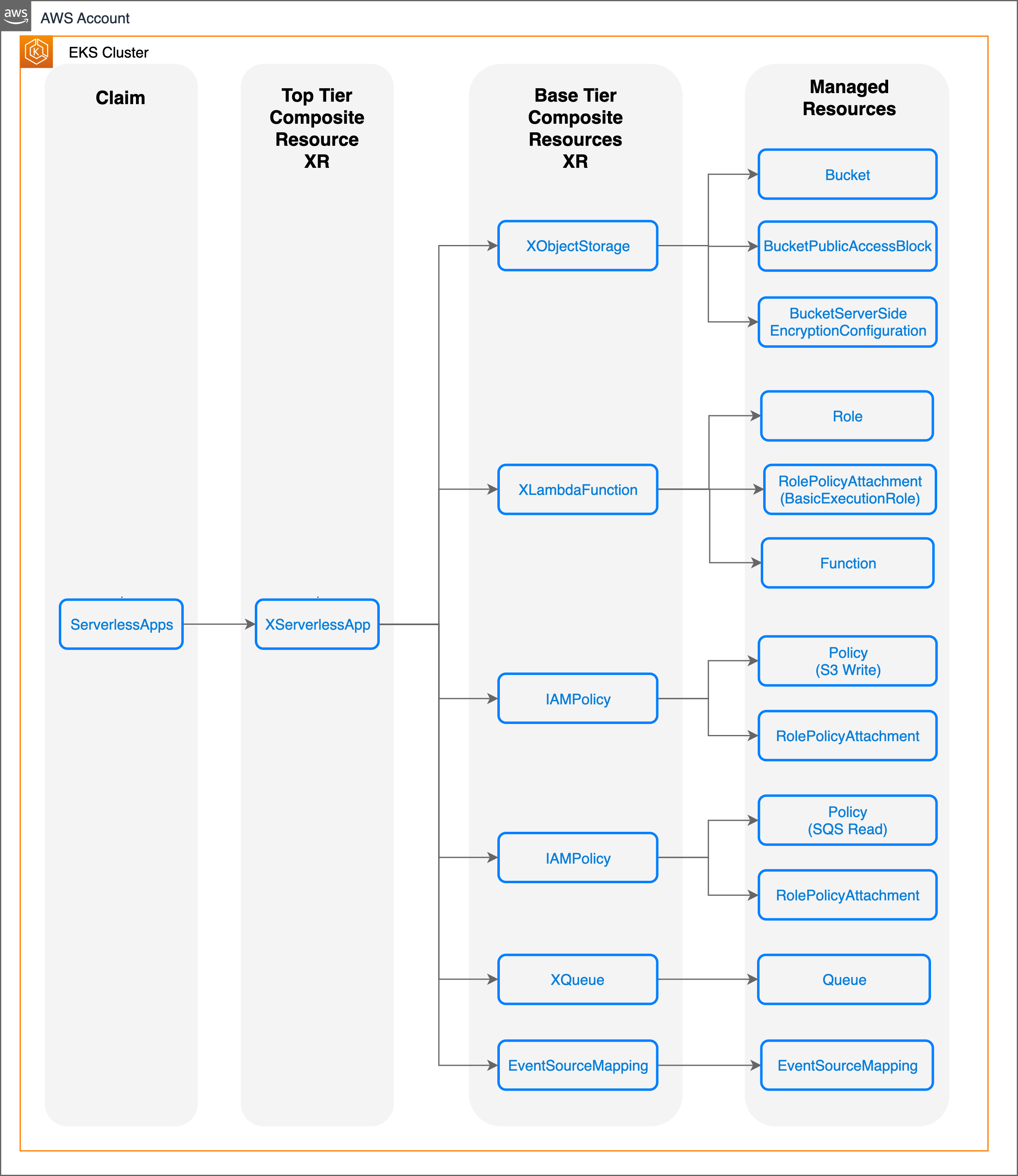
Each XR in the diagram contains the underlying resource refs:
kubectl describe xserverlessapp | grep "Resource Refs" -A 18
Expected output:
Resource Refs:
    API Version:  awsblueprints.io/v1alpha1
    Kind:         XQueue
    Name:         test-sqs-lambda-s3-hc2m5-7qwnb
    API Version:  awsblueprints.io/v1alpha1
    Kind:         EventSourceMapping
    Name:         test-sqs-lambda-s3-hc2m5-9q2kf
    API Version:  awsblueprints.io/v1alpha1
    Kind:         XLambdaFunction
    Name:         test-sqs-lambda-s3-hc2m5-processor
    API Version:  awsblueprints.io/v1alpha1
    Kind:         XObjectStorage
    Name:         test-sqs-lambda-s3-hc2m5-mbqcc
    API Version:  awsblueprints.io/v1alpha1
    Kind:         IAMPolicy
    Name:         test-sqs-lambda-s3-hc2m5-jspzj
    API Version:  awsblueprints.io/v1alpha1
    Kind:         IAMPolicy
    Name:         test-sqs-lambda-s3-hc2m5-2qzfl
Conclusion
In this module, we defined and grouped resources using Crossplane’s XRDs and Compositions. We then used a Claim to create those resources in order to deploy a serverless application.
Created by: