
Transfer Data Records

This sample project demonstrates how to read values from an Amazon DynamoDB table and send them to Amazon SQS using AWS Step Functions

In this project, Step Functions uses the Lambda function to populate the DynamoDB table, uses a for loop to read each of the entries, and then sends each entry to Amazon SQS.
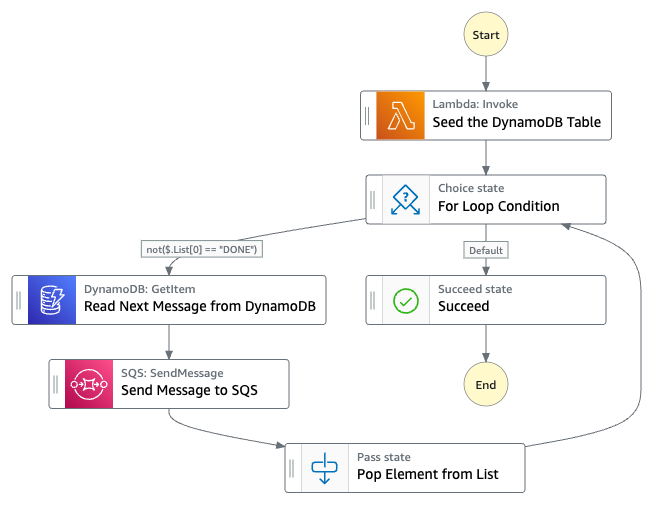
  • Seed the DynamoDB Table: Lambda function adds 10 new items to a DynamoDB table and returns a list of generated message IDs.
  • For Loop Condition: Choice state checks if the first element returned by the previous state is DONE. If yes, the execution ends at Succeed state. If not, it proceeds to the next state.
  • Read Next Message from DynamoDB: Task state retrieves message data from DynamoDB using message ID.
  • Send Message to SQS: Task state sends message data to an SQS queue.
  • Pop Element from List: Pass state removes the first element returned by Seed the DynamoDB Table state and returns the updated array.
  • Succeed: Terminal state that ends the execution of the state machine.

  • < Back to all workflows

    GitHub icon View this workflow on GitHub


    Clone repo

    git clone https://github.com/aws-samples/step-functions-workflows-collection/tree/main/transfer-data-records/cd step-functions-workflows-collection/transfer-data-records

    Deploy

    sam deploy


    Testing

    See the GitHub repo for detailed testing instructions.

    Cleanup

    1. Delete the stack: sam delete.

    Additional resources

    Created by:

    Mohamed Salah

    Mohamed Salah

    Solution Architect with 15 years of experience in IT, leading solution design and project delivery of complex enterprise multi-tier distributed architectures. Expertise in digital transformation and IoT across different industries - public sector, telecommunication and transportation.

    Follow on LinkedIn