
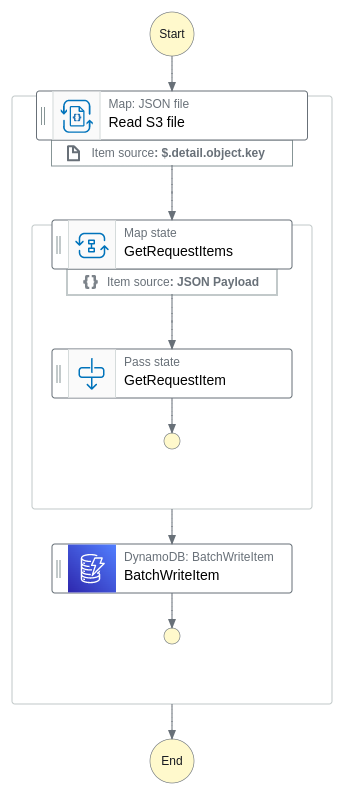
Reads a JSON file from S3 and saves its contents in batches to a DynamoDB table.
When a .JSON file, prefixed with 'create/', is stored in an Amazon S3 bucket, an event indicating the file's creation is dispatched to Amazon EventBridge's default bus. The workflow reads the content of the object, which is expected to be an array in batches of 10. Each batch is processed in parallel by creating its own state machine in Express mode. These batches can be mapped to the desired format before each object is stored in Amazon DynamoDB
< Back to all workflows
Clone repo
git clone https://github.com/aws-samples/step-functions-workflows-collection/tree/main/distributed-batch-import/cd step-functions-workflows-collection/distributed-batch-import
Deploy
sam deploy --guided
Testing
1. Create a new folder called 'create' in the S3 bucket named '{STACK_NAME}-incoming-files'.
2. Upload the './resource/organization-import.json' file to the S3 bucket to trigger the state machine.
Cleanup
1. Delete the stack:
sam delete.2. Delete the S3 bucket:
aws s3 rb s3://{stack-name}-incoming-files --force.Additional resources
Created by: