
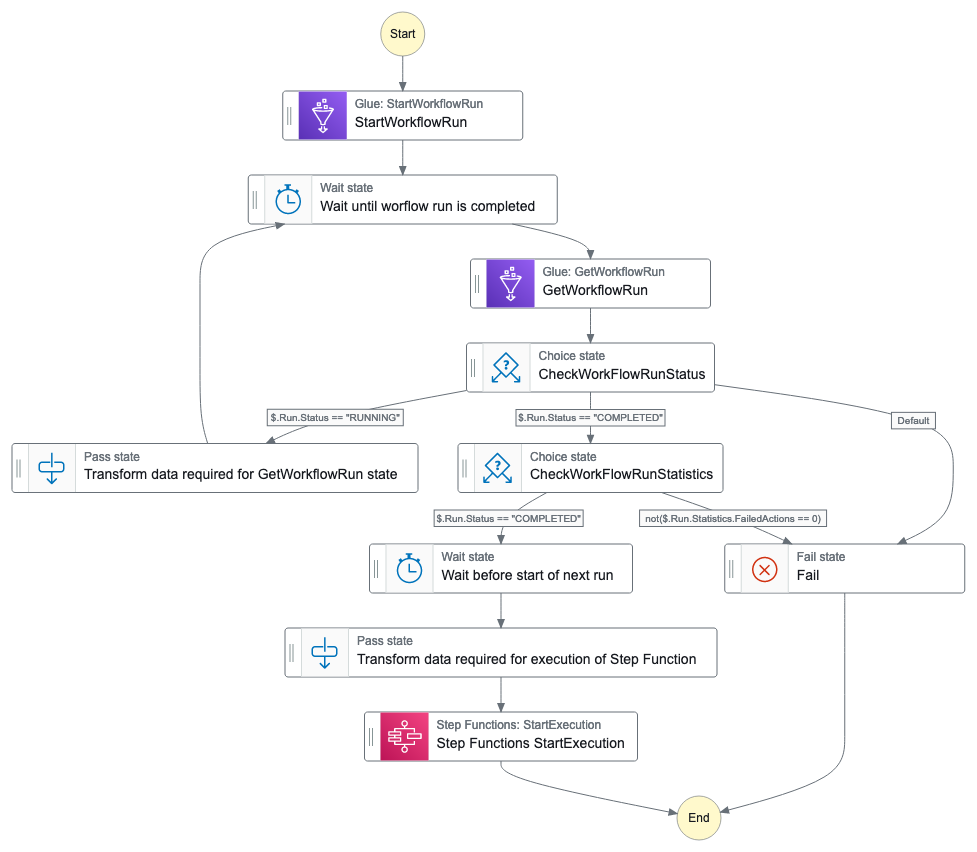
This workflow demonstrates how to orchestrate a continuous running Glue Workflow.
1. Triggering Glue Workflow: Initially, the Step Function triggers a Glue workflow to begin its execution
2. Polling for Completion: After triggering the Glue workflow, the Step Function enters a polling loop. It periodically checks the status of the Glue workflow, every 60 seconds.
3. Completion Check: Once the Glue workflow completes, the Step Function checks if there are any failed actions within the workflow.
4. Decision Making: If there are no failed actions detected, the Step Function initiates a new execution of itself, thereby starting the process all over again. This effectively creates a continuous loop of triggering Glue workflows
5. Decision Making: If there are failed actions within the Glue workflow, the Step Function stops its execution. This ensures that the process halts when errors or failures occur during the Glue workflow execution
< Back to all workflows
Clone repo
git clone https://github.com/aws-samples/step-functions-workflows-collection/tree/main/sfn-continous-running-glue-workflow-tf/cd step-functions-workflows-collection/
Deploy
terraform initterraform apply
Testing
See the GitHub repo for detailed testing instructions.
Cleanup
1. Delete the stack:
terraform destroy.Additional resources
Created by: