Prerequisites
- Understanding AWS Step Functions
Learning Goals
- Learn different techniques and configurations to observe workflows
AWS StepFunctions send logs and metrics to Amazon CloudWatch. Step Functions is also integrated with AWS X-Ray for tracing individual requests to identify performance bottlenecks and troubleshoot errors. Apart from standard metrics and logs, you can use the following techniques to improve the observability of your workflow.
Callback on Success/Failure
Workflows send status change events to Amazon EventBridge. You can use this integration to apply rules and target another Step Functions state machine for failure handling, send the event to a DLQ for further analysis or send a Slack notification.
Capture Distributed Map results
ResultWriter is an attribute of Step Functions Distributed Map state that allows you to capture the results of the integrations and write to an Amazon S3 bucket. Result writer automatically aggregates results of map executions by status of the items and writes in an S3 bucket, one file for each status. You need to apply life cycle policies on the S3 bucket so that you do not incur cost. Results writer is a great option if you want to process the failed executions later.
        "Resource": "arn:aws:states:::s3:putObject",
        "Parameters": {
          "Bucket": "your-results-buckets",
          "Prefix": "results"
        }
Understand failure toleration
Failures are common in file data processing. When you have millions of records being processed, you don’t want to proceed to run the workflow when you have lots of missing or incorrect data. You can set a failure toleration percentage or count with your Distributed Map and it fails the execution when it reaches the failure percentage.
      "ToleratedFailurePercentage": 15,
      "ToleratedFailureCount": 100
With the above setting, Distributed Map fails if either 100 items fail or 15% of the items fail to process.
Respond to operational issues quicker
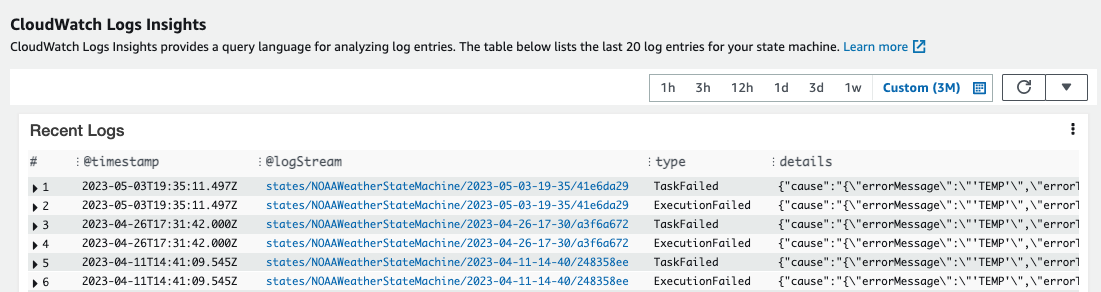
When you enable logging for your workflow, Step Functions automatically queries the logs and shows CloudWatch Log insights in the Step Functions console.
For more information on using Distributed Map for serverless data processing, see the Large-Scale Parallelization with Distributed Map Workshop or visit Serverless Land for more Distributed Map resources."
Created by: