Invoking Amazon ECS task using Wait for Callback integration
You can invoke ECS RunTask API using Wait for a Callback integration pattern. With this pattern, you send a task token to the ECS task, and then send the token back from ECS task to your workflow using the Step Functions API. EKS integration does not allow running an EKS job with callback token.
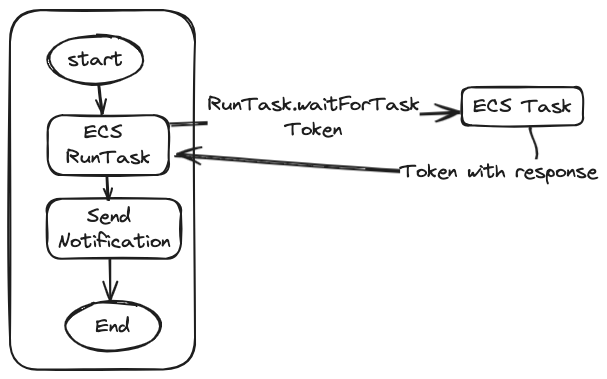
The Amazon States language (ASL) for Wait for a Callback pattern is similar to the Run a Job integration except the resource attribute has .waitForTaskToken and task token is sent to the ECS task using the Environment attribute.
"Environment":[
  {
      "Name":"TASK_TOKEN_ENV_VARIABLE",
      "Value.$":"$$.Task.Token"
  }
The Step Functions state invokes ECS task and pauses until the task token is returned. ECS task completes the business operation, returns the task token back to Step Functions by either sending success or failure along with any response.
client = boto3.client('stepfunctions')
task_token = os.environ['TASK_TOKEN_ENV_VARIABLE']

if success:
  client.send_task_success(
    taskToken = task_token,
    output = stringoutput
  )
else:
  client.send_task_failure(
    taskToken = task_token,
    cause = strCause,
    error = strError
  )
This integration pattern offers couple of advantages over Run a job integration.
- You can send response from Amazon ECS task to Step Functions workflow as part of sending the token back.
- Wait for a Callback integration avoids DescribeTasks API throttles at high volume as there is no constant polling from Step Functions to get the status of ECS task. The status is returned to Step Functions using the Step Functions API.
However, because task token has to be sent back to Step Functions, ECS task requires permissions to invoke the Step Functions APIs and custom code has to be written in the ECS task to send the token back. You can try out the Wait for a callback integration using the Serverless land pattern.
Created by: