In addition to proactive evaluation, AWS Config can also reactively detect resource deployments and configurations that do not comply with your governance policies. This is important as governance policies are always evolving as your organization learns and implements new best practices.
Consider a scenario where you set a brand new policy when deploying or updating Lambda functions: All Lambda functions must always use a specific, approved Lambda layer version. You can configure AWS Config to monitor new or updated functions for layer configurations. If it detects a function that is not using an approved layer version, it flags the function as a non-compliant resource. You can optionally configure AWS Config to auto-remediate the resource by specifying a remediation action using an AWS Systems Manager Automation document. For example, you could write an automation document in Python using the AWS SDK for Python (boto3), which updates the non-compliant function to point to the approved layer version. Thus, AWS Config serves as both a detective and corrective control, automating compliance management.
Let us break down this entire process in 3 important phases to implement:

Phase 1: Identify Access Resources
You start by first activating AWS Config across your accounts and configuring it to record AWS Lambda functions. This allows AWS Config to observe when Lambda functions are created or updated. You can then configure custom policy rules to check for specific policy violations, which use CloudFormation Guard syntax. CloudFormation Guard rules take the following general form:
rule name when condition { assertion }
Below is a sample rule that checks to ensure that a layer is not set to an old layer version:
rule desiredlayer when configuration.layers !empty {
    some configuration.layers[*].arn != CONFIG_RULE_PARAMETERS.OldLayerArn
}
Lets understand the rule syntax and structure:
- Rule name: The name of the rule in the provided example is
desiredlayer. - Condition: This clause specifies the condition under which the rule should be checked. In the provided example, the condition is
configuration.layers !empty. This means the resource should be evaluated only when thelayersproperty in the configuration isn't empty. - Assertion: After the when clause, an assertion determines what the rule checks. The assertion
some configuration.layers[*].arn != CONFIG_RULE_PARAMETERS.OldLayerArnchecks if any of the Lambda layer ARNs do not match theOldLayerArnvalue. If they do not match, the assertion is true and the rule passes; otherwise, it fails.
CONFIG_RULE_PARAMETERS is a special set of parameters that is configured with the AWS Config rule. In this case, OldLayerArn is a parameter inside CONFIG_RULE_PARAMETERS. This allows users to provide a specific ARN value that they consider old or deprecated, and then the rule checks if any Lambda functions are using this old ARN.
Phase 2: Visualize and Design
Since AWS Config is now activated and configured to record Lambda functions, it gathers configuration data and stores that data in S3 buckets. You can use Amazon Athena to query this data directly from your S3 buckets. With Athena, you can aggregate this data at the organizational level, generating a holistic view of your resource configurations across all your accounts. To set up aggregation of resource configuration data, refer to this Cloud Operations and Management blog post.
Below is a sample Athena query to identify all Lambda functions using a particular layer ARN:
WITH unnested AS (
  SELECT
    item.awsaccountid AS account_id,
    item.awsregion AS region,
    item.configuration AS lambda_configuration,
    item.resourceid AS resourceid,
    item.resourcename AS resourcename,
    item.configuration AS configuration,
    json_parse(item.configuration) AS lambda_json
  FROM
    default.aws_config_configuration_snapshot,
    UNNEST(configurationitems) as t(item)
  WHERE
    "dt" = 'latest'
    AND item.resourcetype = 'AWS::Lambda::Function'
)

SELECT DISTINCT
  region as Region,
  resourcename as FunctionName,
  json_extract_scalar(lambda_json, '$.memorySize') AS memory_size,
  json_extract_scalar(lambda_json, '$.timeout') AS timeout,
  json_extract_scalar(lambda_json, '$.version') AS version
FROM
  unnested
WHERE
  lambda_configuration LIKE '%arn:aws:lambda:us-east-1:01234567890:layer:AnyGovernanceLayer:24%'
Below are results from the query:

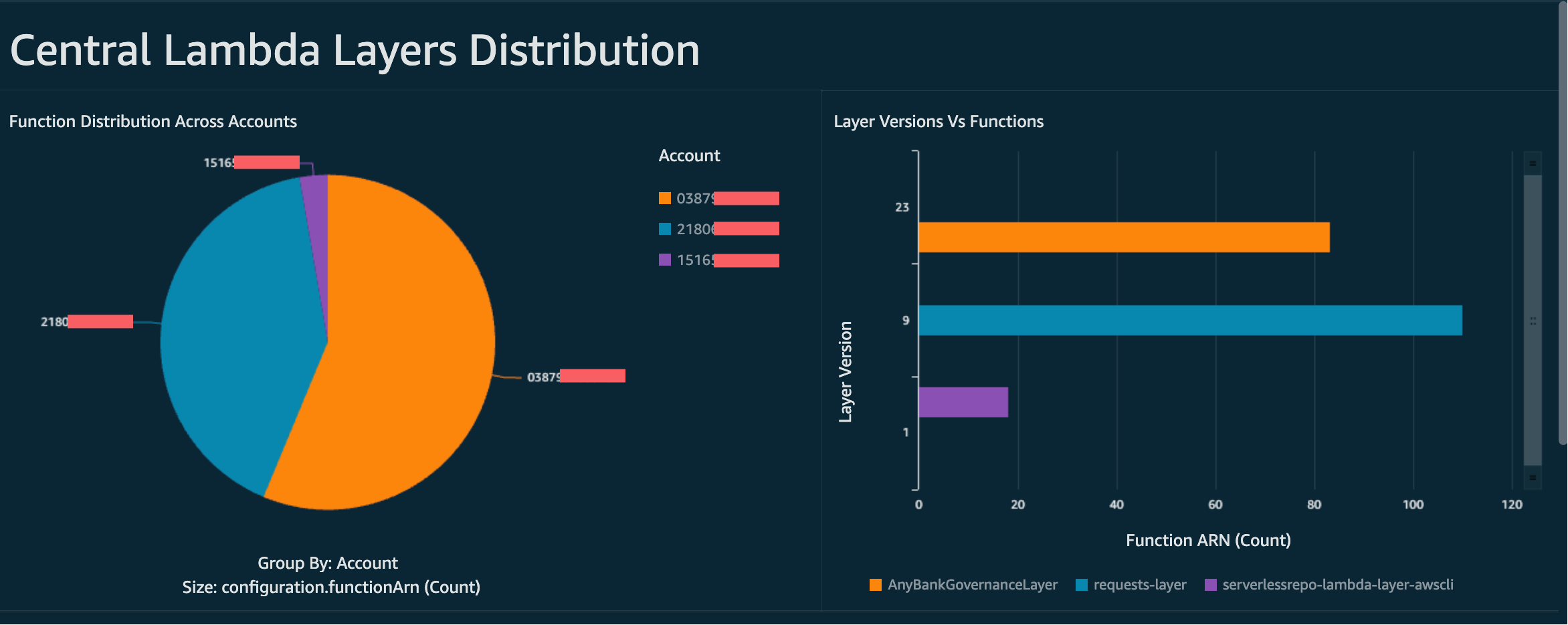
With the AWS Config data aggregated across the organization, you can then create a dashboard using Amazon QuickSight. By importing your Athena results into QuickSight, you can visualize how well your Lambda functions adhere to the layer version rule. This dashboard can highlight compliant and non-compliant resources, which helps you to determine your enforcement policy, as outlined in the next phase. The following image is an example dashboard that reports on the distribution of layer versions applied to functions within the organization.
Phase 3: Implement and Enforce
You can now optionally pair your layer version rule that you created in phase 1 with a remediation action via an AWS Systems Manager Automation document, which you author as a Python script written with AWS SDK for Python (boto3). The script calls the UpdateFunctionConfiguration API for each AWS Lambda function, updating the function configuration with the new layer ARN. Alternatively, you could have the script instead submit a pull request to the code repository to update the layer ARN. This way future code deployments are also updated with the correct layer ARN.
These controls can also be packaged into an AWS Config Conformance Pack and deployed across your AWS Organization. AWS Config now enforces layer usage rules across all accounts, identifying and correcting non-compliant resources automatically. By implementing these phases at an organizational level, AWS Config allows you to maintain centralized detective control over your AWS environment, ensuring that your resources are continuously monitored and compliant with your organization's policies and guidelines.
Created by: