Cold Start Latency
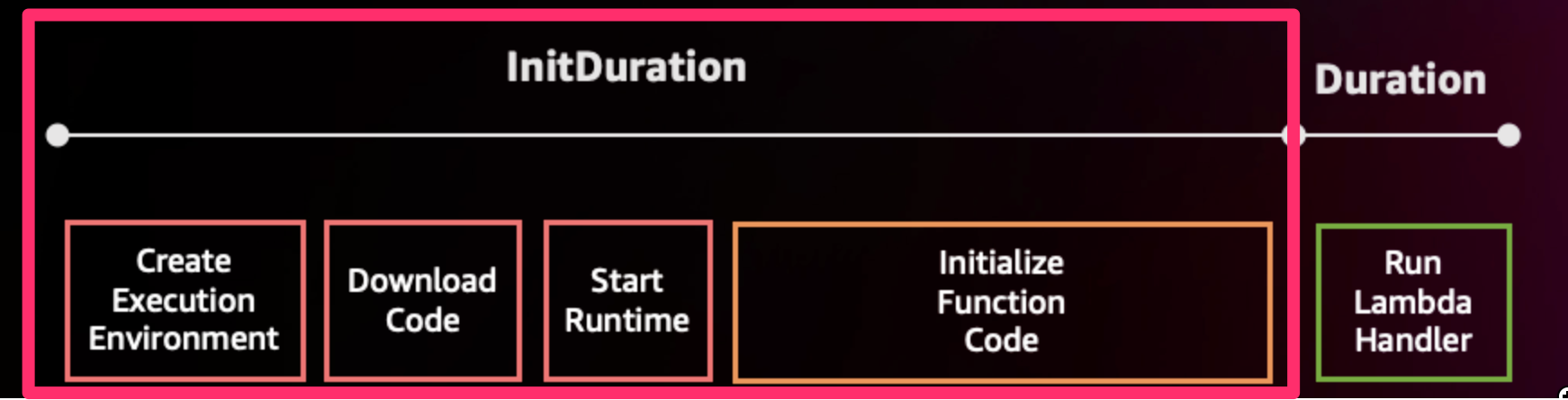
As we saw in previous sections, there are a few steps in the Lambda invocation lifecycle. Before Lambda can handle incoming requests, it spends time initializing the function, which includes creating an execution environment, loading the function's code, starting the runtime, and initializing the function code. This is referred to as cold start time, which is often the largest contributor to startup latency. This can cause degraded user experience for interactive workloads.
What is Lambda SnapStart?
SnapStart for AWS Lambda helps improve startup performance by up to 10x at no extra cost. It typically requires no changes to the function code, thus minimizing effort required by developers. With SnapStart, Lambda initializes your function when you publish a function version. Lambda takes a Firecracker microVM snapshot of the memory and disk state of the initialized execution environment, encrypts the snapshot, and caches it for low-latency access. When you invoke the function version for the first time, and as the invocations scale up, Lambda resumes new execution environments from the cached snapshot instead of initializing them from scratch, improving startup latency.
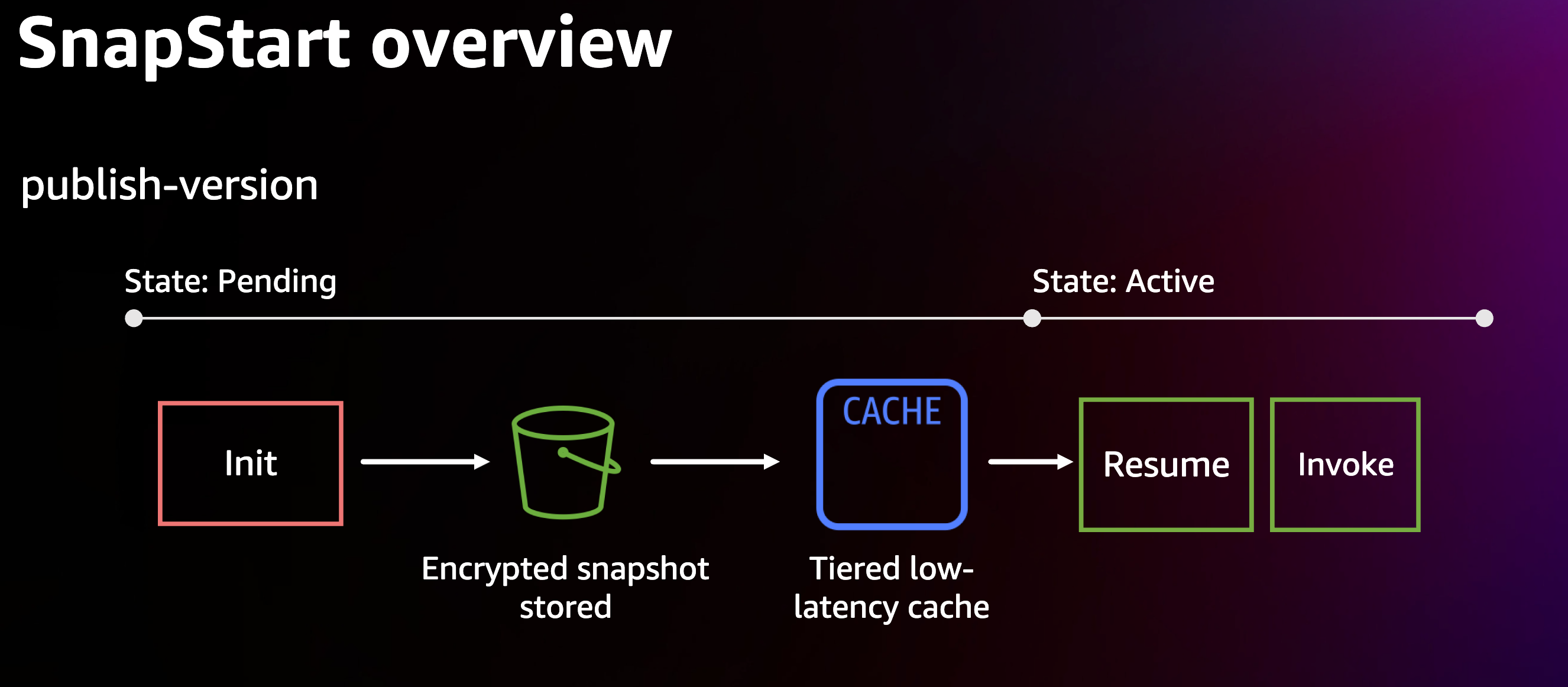
A function version activated with SnapStart transitions to an Inactive state if it remains idle for 14 days, after which Lambda deletes the snapshot. When this inactive Lambda is invoked, the invocation fails and Lambda begins initializing a new snapshot in the background, during which the function version remains in Pending state. After the snapshot is complete, the function version transitions to Active state, and then it is ready for invocation.
Activating SnapStart
As of this writing, SnapStart can be configured on any Lambda with Java 17 and Java 11 managed runtimes. SnapStart can be activated on new and existing functions using the AWS Console, AWS CLI or AWS Lambda API.
An important point to note while activating Lambda SnapStart is that when SnapStart is enabled, you have to publish a new Lambda version before invoking and using SnapStart benefits. SnapStart can be used only on a published Lambda function version or alias that points to a version, instead of the
$latestversion. In order to avail the benefits of Lambda SnapStart, the services that are invoking Lambda function have to point to that version of Lambda function where SnapStart is enabled. For example, an Amazon API Gateway endpoint has to point to the ARN of the Lambda function which has the version at the end of the ARN or better, to a Lambda alias which points to that version of Lambda function. You can see how that is done in the Terraform example below.
You can also use AWS SAM and AWS CDK to enable SnapStart for a Lambda function.
AWS SAM
AWSTemplateFormatVersion: '2010-09-09'
Transform: AWS::Serverless-2016-10-31

Resources:
  HellowWorldFunction:
    Type: AWS::Serverless::Function
    Properties:
      CodeUri: target/sample-app-aws.jar
      Handler: com.example::handleRequest
      Runtime: java17
      Timeout: 30
      MemorySize: 1024
      AutoPublishAlias: live
      SnapStart:
        ApplyOn: PublishedVersions
AWS CDK
Function.Builder.create(this, "HelloFunction")
  .runtime(Runtime.JAVA_17)
  .code(Code.fromAsset("build/libs/sample-app-aws.jar"))
  .handler("example.Handler::handleRequest")
  .snapStart(SnapStartConf.ON_PUBLISHED_VERSIONS)
  .build();
Terraform
For Terraform, you have to explicitly create a Lambda alias that points to the Lambda version where SnapStart is enabled. That way, an Amazon API Gateway endpoint can point to that Lambda alias. The Terraform template code would look like the following:
resource "aws_lambda_function" "UnicornStockBrokerFunction" {
  function_name = "UnicornStockBrokerFunction"
  filename = var.SourceCodePath
  handler = "org.springframework.cloud.function.adapter.aws.FunctionInvoker::handleRequest"
  runtime = "java11"

  environment {
    variables = {
      TABLE_NAME = aws_dynamodb_table.transactions_table.name
      BUCKET_NAME = aws_s3_bucket.validationfiles-bucket.id
      JAVA_TOOL_OPTIONS = "-XX:+TieredCompilation -XX:TieredStopAtLevel=1"
    }
  }

  source_code_hash = filebase64sha256(var.SourceCodePath)
  role = aws_iam_role.UnicornStockBrokerFunctionRole.arn

  timeout     = "200"
  memory_size = "2048"

  # Enable SnapStart and apply on Published Versions
  snap_start {
    apply_on ="PublishedVersions"
  }
  publish = true
}

# Create an Alias pointing to the newly created Lambda version
resource "aws_lambda_alias" "UnicornStockBrokerFunction_SnapStartAlias" {
  name             = "SnapStart"
  description      = "Alias for SnapStart"
  function_name    = aws_lambda_function.UnicornStockBrokerFunction.function_name
  function_version = aws_lambda_function.UnicornStockBrokerFunction.version
}

resource "aws_api_gateway_integration" "createproduct-lambda" {
  rest_api_id = aws_api_gateway_rest_api.unicornstockbroker_apigw.id
  resource_id = aws_api_gateway_method.createtransactions.resource_id
  http_method = aws_api_gateway_method.createtransactions.http_method

  integration_http_method = "POST"
  type                    = "AWS_PROXY"

  # Point API GW endpoint to the Lambda alias invoke ARN
  uri = aws_lambda_alias.UnicornStockBrokerFunction_SnapStartAlias.invoke_arn
}
Refer this sample application for the full implementation.
Considerations
Ephemeral Data: Due to a different lifecycle than traditional Lambda, there are some special considerations for SnapStart enabled Lambda functions. With on-demand Lambda, sometimes it is optimal to initialize certain data in the init phase so that it can be reused for future invocations. In SnapStart enabled Lambdas this data is stored along with the snapshot. So ephemeral data (like database passwords, network connections) may not be valid when restored from a snapshot days or weeks later.
Uniqueness: Another challenge with storing snapshots is if seeds used to generate random data are stored with a snapshot, then randomness may not be guaranteed. AWS has changed managed runtimes to ensure uniqueness and randomness when restoring functions. These updates have been incorporated in Amazon Linux 2. Java’s built-in random number generator
java.security.SecureRandomalso maintains uniqueness when resuming from a snapshot. If you generate uniqueness via custom code then avoid caching data that is intended to be unique, instead generate this data either inside the function handler or use runtime hooks described below.Credential Provider Chain: The AWS SDK searches for credentials in a predetermined order. However, SnapStart removes the environment variable provider, as the snapshot should not include environment variables, which will include temporary access/secret keys in the environment. This is to prevent temporary credentials from getting included in the snapshot. The recommendation is to use either
ContainerCredentialsProvideror theDefaultCredentialsProvider, which will search through that chain and land on the container credentials provider.Support: As of August 2024, Provisioned Concurrency is not supported by Lambda SnapStart. However, Lambda SnapStart is available for both x86_64 and Graviton2 processors (arm64).
Refer to additional best practices for working with Lambda SnapStart.
Runtime Hooks
Lambda SnapStart supports pre- and post-hooks to allow developers a way to customize how the function reacts to snapshot creation and restore. The Lambda Java managed runtime uses the open-source Coordinated Restore at Checkpoint (CRaC) project to provide hook support. The managed Java runtime contains a customized CRaC context implementation that calls your Lambda function’s runtime hooks before completing snapshot creation and after restoring the execution environment from a snapshot.
Here is an example of runtime hooks where DynamoDB describeTable() call is made to create a connection to DynamoDB
before checkpointing:
import org.crac.Resource;
import org.crac.Core;
import org.crac.Context;

public class HelloWorldHandler implements RequestHandler<APIGatewayProxyRequestEvent, APIGatewayProxyResponseEvent>, Resource {
  private final ObjectMapper objectMapper = new ObjectMapper();
  private static final String PRODUCT_TABLE_NAME = System.getenv("PRODUCT_TABLE_NAME");

  private final DynamoDbAsyncClient dynamoDbClient = DynamoDbAsyncClient.builder()
    .credentialsProvider(DefaultCredentialsProvider.create())
    .region(Region.of(System.getenv(SdkSystemSetting.AWS_REGION.environmentVariable())))
    .httpClientBuilder(AwsCrtAsyncHttpClient.builder())
    .build();

  public HelloWorldHandler() {
    Core.getGlobalContext().register(this);
  }

  public APIGatewayProxyResponseEvent handleRequest(String APIGatewayProxyRequestEvent, Context context) throws IOException {
    // Use DynamoDB client to put/get item after parsing incoming event
    // and return product as result

    return new APIGatewayProxyResponseEvent()
      .withStatusCode(200)
      .withHeaders(Map.of(CONTENT_TYPE, "application/json"))
      .withBody(objectMapper.writeValueAsString(product));
  }

  @Override
  public void beforeCheckpoint(Context<? extends Resource> context) throws Exception {
    // This code executes right before a checkpoint is created
    System.out.println("Before Checkpoint");

    try {
      dynamoDbClient.describeTable(DescribeTableRequest.builder()
        .tableName(PRODUCT_TABLE_NAME)
        .build()
      ).get();
    } catch (InterruptedException | ExecutionException e) {
      logger.error("describeTable failed with message {}", e.getMessage());
    }
  }

  @Override
  public void afterRestore(Context<? extends Resource> context) throws Exception {
    // This code executes right after a Lambda is restored from a checkpoint,
    // and before it is ready to handle requests
    System.out.println("After Restore");
  }
}
Make sure the runtime hook method signature has
throws Exceptioneven if an IDE complains about an exception not being thrown. This helps in troubleshooting while looking at the Lambda function's execution logs.
Resource Priming
Due to the nature of how just in time (JIT) compilation of Java works,
it is best to execute all possible code paths before a snapshot is taken to ensure that your Java application needs
minimal JIT compilation upon first invocation. This process is called Priming and can be done by using before snapshot hook.
For example, if your function reads from DynamoDB, you can call a read operation in the beforeCheckpoint() hook thus
ensuring that AWS SDK for Java and any other libraries needed for this operation are compiled and saved with the snapshot.
However, particular care should be taken to catch exceptions to not interrupt the snapshot process.
SnapStart Bug Scanner
It is also recommended that you use SnapStart Bug Scanner that can scan code for known anti-patterns with SnapStart.
Trying out Lambda SnapStart
You can try out Lambda SnapStart through the publicly available Java on AWS Lambda workshop.
Created by: