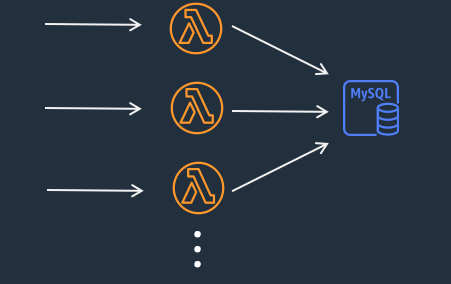
AWS Lambda scales up and down very quickly in response to demand. In architectures where Lambda functions connect to a backend relational database, rapid scaling of Lambda functions can initiate or drop hundreds to tens of thousands of concurrent connections to the database, exhausting database memory and compute resources.
Connection pooling in AWS Lambda
In your application running on AWS Lambda, if you use database connection pooling libraries like HikariCP, then you have to be careful about the default connection pool size set by those libraries. As mentioned earlier in the challenge section, a single Lambda function execution environment can handle only one request at a time. Therefore, when the Lambda function code is executed, you will never need more than one connection pool to work per execution environment. So, set the maximum connection pool size to 1 in your application.
However, Lambda functions can scale up rapidly based on incoming requests. Thus, requiring many connections from many execution environments. This situation will easily overwhelm the underlying database. This is where Amazon RDS Proxy can help ensure to stay within database connection pool limits.
Amazon RDS Proxy
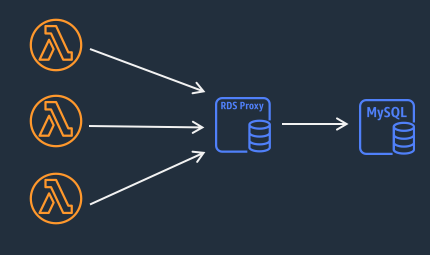
Amazon RDS Proxy is a fully managed, highly available database proxy for Amazon Relational Database Service (RDS) that makes applications more scalable, more resilient to database failures, and more secure. Essentially, it acts as an intermediary between your application and the database, poling and managing connections to the database, and enhances read and write scalability by efficiently managing and reusing database connection.
RDS Proxy allows Lambda functions to pool and share connections established with the database there by improving application performance. Amazon RDS Proxy supports Amazon Aurora database and Amazon RDS.
Enabling Amazon RDS Proxy
Amazon RDS Proxy can be enabled for most applications without the need to provision or manage any additional infrastructure. You can automatically set up connectivity between Lambda function and the Amazon RDS or Amazon Aurora database. Doing this minimizes the need for additional manual networking tasks such as setting up an AWS Virtual Private Cloud (VPC), security groups, subnets, and ingress/egress rules to establish a connection between your serverless application and a database.
Learn more about setting up connectivity to a compute resource from your RDS or Aurora database console in the Amazon RDS User Guide and the Amazon Aurora User Guide.
RDS Proxy Use Cases
Applications with bursts of traffic that open and close large number of connections and don’t have connection pooling mechanisms.
Security Enhancement: Amazon RDS Proxy enforces the authentication policies for client connections. You can take advantage of IAM authentication of your Lambda functions, instead of managing database credentials in your Lambda application code.
AWS Lambda functions are a good candidate for Amazon RDS Proxy. RDS Proxy offers connection pooling that helps manage database connections efficiently during traffic spikes.
Building resilient architectures: Amazon RDS Proxy bypasses Domain Name System (DNS) caches to reduce failover times by up to 60% for Aurora Multi-AZ databases.
Example
Using AWS CDK and Java, you can create an RDS proxy for as shown below.
The RDS cluster created earlier, security groups, and secrets are needed to create DatbaseProxy
DatabaseProxy proxy = new DatabaseProxy(this, "RDSProxy", DatabaseProxyProps.builder()
  .proxyTarget(ProxyTarget.fromCluster(rdsCluster))
  .securityGroups(List.of(rdsSecurityGroup))
  .secrets(List.of(rdsSecret))
  .role(proxyRole)
  .requireTls(true)
  .vpc(vpc)
  .build());

String rdsProxyEndpoint = proxy.getEndpoint();
Now, the Lambda function can use rdsProxyEndpoint to communicate to the database through RDS proxy.
You can pass the rds proxy endpoint url as an environment variable to the Lambda function.
Function function = Function.Builder.create(this, "UnicornStoreFunction")
  // other attributes are removed for brevity
  .runtime(Runtime.JAVA_17)
  .environment(Map.of(
    "RDS_PROXY_ENDPOINT", rdsProxyEndpoint
  ))
  .build();
Created by: