Functional or End-to-end testing is a way to assert on the behavior of the application when it runs in production environment. For serverless application, it will be mainly tested in the cloud without using mocks or emulators.
The advantage of doing end-to-end or functional test on AWS for Java based serverless application or any serverless application is that your non-prod environment (a sandbox AWS Account) is an exact copy of your production environment (a centrally managed AWS account).
Testing in the Cloud
When you run tests against cloud-based code that also interacts with cloud-based services, you get the most accurate measure of the code quality.
Although the test runs locally, it interacts with cloud-based resources. These resources could have been deployed using AWS SAM, or AWS CDK, CloudFormation, or Terraform. The test code first retrieves the deployed stack outputs, which includes the API endpoint, function ARN, and security role.
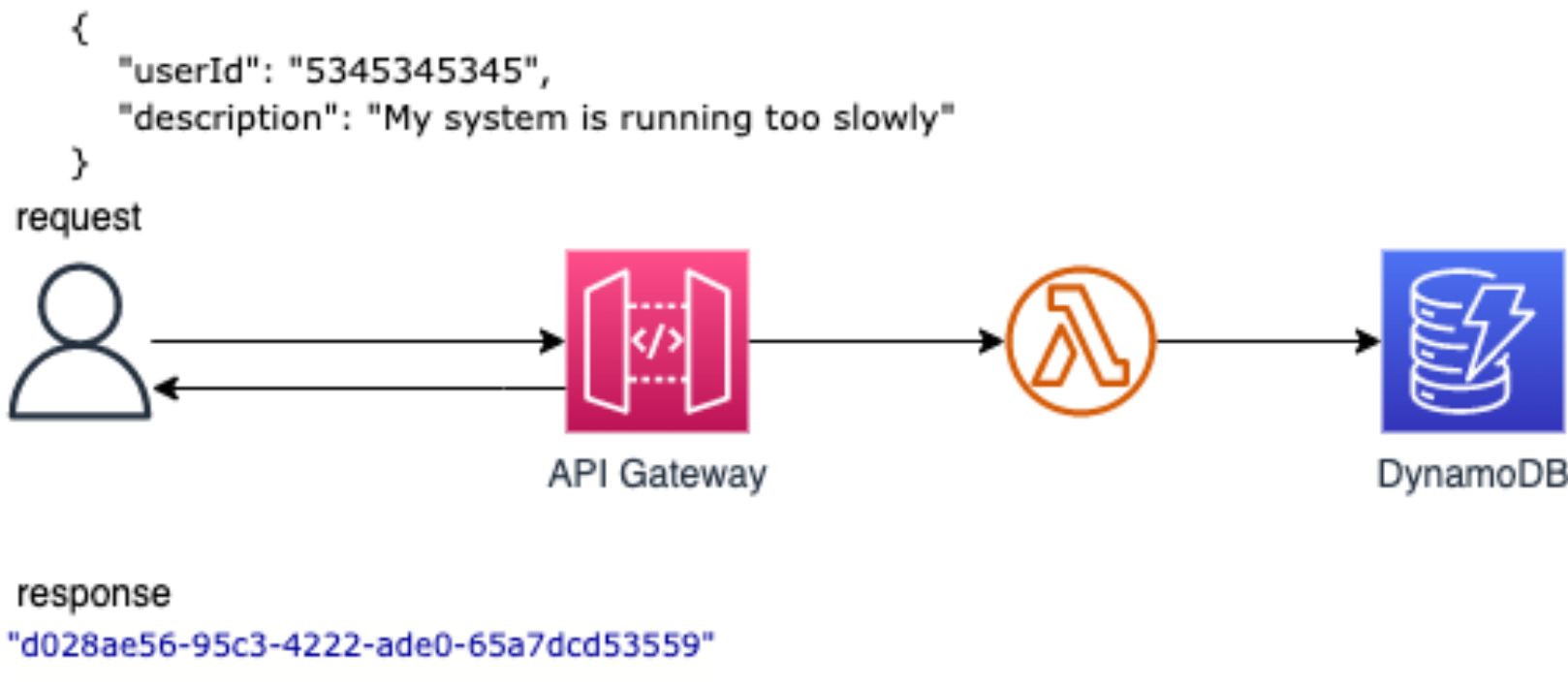
Following the above API example,
the test sends a request to the API endpoint to create a ticket in Ticket DynamoDB table,
and responds with the newly created ticketId.
This test runs entirely against cloud-based resources to verify those resources are deployed,
secured, and work as expected.
The TicketFunction handles the request. The function test would use an HTTP Client to call the actual endpoint that has been provisioned on AWS.
Before running the tests, you make sure that the endpointUrl can be retrieved from the CloudFormation stack,
and optionally, you have created a DynamoDB
client to assert the newly created ticket:
@BeforeAll
static void setUp() {
  ddbClient = DynamoDbClient.builder()
    .region(Region.US_EAST_1)
    .build();

  cloudFormationClient = CloudFormationClient
    .builder().region(Region.US_EAST_1).build();

  DescribeStacksResponse response = cloudFormationClient.describeStacks(DescribeStacksRequest.builder()
    .stackName(STACK_NAME)
    .build());
  apiEndPoint = response.stacks().get(0).outputs().get(0).outputValue();
}
The actual test case would look like following.
The test case uses RestAssured to create tests that correspond to
Behavior-driven Development (BDD).
@Test
public void testPost() {
  String ticketId =
    given()
      .header("Content-Type", "application/json")
      .header("Accept", "application/json")
      .body("{\"description\": \"Lambda rocks\", \"userId\": \"testuser\"}")
    .when()
      .post(apiEndPoint)
    .then()
      .assertThat().statusCode(HttpStatusCode.OK)
      .body(notNullValue())
      .extract()
      .asString();

  ticketList.add(ticketId.substring(1, ticketId.length() - 1));
  DynamoTestUtil.validateItems(ticketList, ddbClient);
}
A negative test case would look like:
@Test
public void testPostWithBadPayload() {
  given()
    .header("Content-Type", "application/json")
    .header("Accept", "application/json")
    .body("{\"description\":, \"userId\": \"testuser\"}")
  .when()
    .post(apiEndPoint)
  .then()
    .assertThat().statusCode(HttpStatusCode.BAD_REQUEST);
}
Refer TicketEnd2EndTest.java for the complete implementation.
This tests assumes that the DynamoDB table is provisioned in your AWS account,
and you have the appropriate credentials locally to access this account (for example in ~/.aws/credentials).
To do that, you need first to deploy the SAM Template provided in the repository using the commands
sam build and sam deploy as follows:
$ sam build
...
Build Succeeded

$ sam deploy --guided
Configuring SAM deploy
======================

  Looking for config file [samconfig.toml] :  Found
  Reading default arguments  :  Success

  Setting default arguments for 'sam deploy'
  =========================================
  Stack Name [apigw-lambda-ddb]: apigw-lambda-ddb
  AWS Region [us-east-2]: us-east-2
  ....
Make sure to specify the AWS Region us-east-2 as TicketFunctionIntegrationTest.java assumes that the DynamoDb table is deployed in us-east-2
Created by: