Filtering & Batching events
Are you building or have an existing stream processing application that uses AWS Lambda? Are you looking to optimize your Lambda costs?
You are in the right place! Streaming applications are used in a variety of scenarios to gain business insights from clickstream data, capture the device data from thousands or millions of IoT devices, real-time stock trading applications, while imagination is the limit for the applications you can build. Once the stream data is available, it has to be processed as quickly as possible. AWS Lambda is a serverless compute service that allows companies to focus on delivering business value by removing the undifferentiated heavy-lifting of infrastructure management. AWS Lambda allows you to process the events from various data streams like Kinesis, DynamoDB, SQS, Kafka, and MQ, and automatically scales up and down to match the required capacity. Let's take a closer look into how you can reduce the overall Lambda costs while using streaming application.
AWS Lambda function costs are based on three major factors - invocations, memory assigned, and the duration of the function. Changes to any of the three factors has a direct impact on the lambda costs, i.e. if we reduce the number of overall invocations, we can reduce the overall Lambda function costs.
Filtering incoming events
By configuring the event source with the filter criteria, you can reduce the number of messages that are used to invoke your Lambda function and the memory associated to filter out the events. By default, you can add up to five filters (10,240 characters) for a single event source mapping which are logically ORed together.
You can add filters to event source mappings for the following AWS services:
- Amazon DynamoDB
- Amazon Kinesis Data Streams
- Amazon MQ
- Amazon Managed Streaming for Apache Kafka (Amazon MSK)
- Self-managed Apache Kafka
- Amazon Simple Queue Service (Amazon SQS)
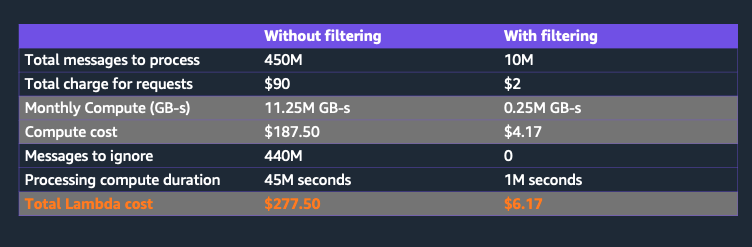
Let's take an example of a shopping mall which uses 10,000 temperature sensors to automatically tune the air conditioner temperature. Stores with more customers, food courts, mall entrance tend to have higher temperatures compared to other spots within the mall. Assume the temperature sensors emits the temperature once a minute. Each month, the mall receives 10,000 * 60 * 24 * 31 ~ 450 million messages, which invokes the same number of Lambda invocations. With 255 MB of function memory and an average function duration of 100ms, let's filter out the temperatures which are greater than 70 degrees in the mall entrance. You can configure the following filter
{
	"body": {
		"sensorId": [{
			"prefix": "mall-entrance-"
		}],
		"temperature": [{
			"numeric": [">", 70]
		}]
	}
}
For events, with sensorId that starts with "mall-entrance" and temperature greater than 70, the lambda function is invoked, else the message is discarded and the function is not invoked. If we need only 2.2% of the data, then the number of invocations and compute is reduced by 97.8% and similarly the Lambda costs. Let's see how the pricing changes with and without filtering:
Batching incoming events
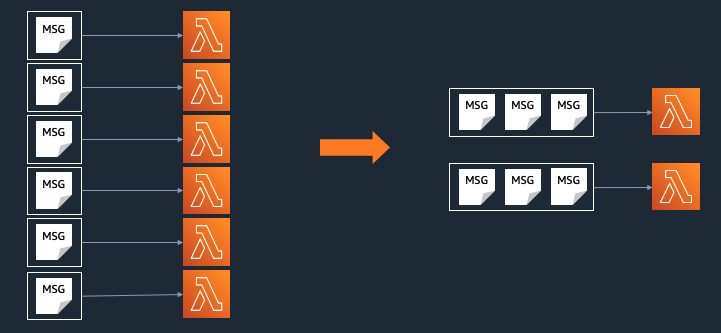
An alternative way to optimize Lambda costs is by batching the incoming messages. AWS Lambda offers you to configure the batch size from the stream event sources. Lambda reads the messages in batches and provides these to your function as an event payload. You can batch up to 10,000 messages or 6 MB whichever reaches first, and the poller invokes the Lambda function with the messages payload. Batching not only improves the throughput, but also speeds up the processing of your application, while reducing the overall Lambda costs.
What should be my batch size?
We recommend you to find the batch size that addresses your business needs and process the messages in parallel. Larger batch sizes mean lesser invocations, however, it does not mean that you always have to use the largest possible batch size. It has to be balanced with other components of your application, think about how the processed data influences the downstream services, third-party API requests, network capacity, database throughput/ IO limits. In addition, we recommend you to run load tests on your function code to test the Lambda code performance and tune the function memory according to the preferred batch size.
References
https://docs.aws.amazon.com/lambda/latest/dg/invocation-eventfiltering.html
Created by: